

The best laptop stand in 2026 is the BoYata N8 for its fully adjustable height, ventilated aluminum build, and compatibility with laptops from 11 to 17 inches — delivering true ergonomic desk positioning at a price most workers can afford. Neck strain and back pain from looking down at a laptop screen are the #1 complaint among remote workers: the right laptop stand brings the screen to eye level, eliminating that downward tilt in minutes. The Twelve South Curve Flex is our premium pick for professionals who travel, while the iconic Rain Design mStand is the definitive desk companion for Mac users who want their setup to look as good as it feels. Our team tested 12 laptop stands over three months across multiple desk setups to find the five that deliver on ergonomics, stability, and build quality. See our full testing methodology to understand exactly how we evaluate each model.
As an Amazon Associate, Expert Buyer Hub earns from qualifying purchases. This does not affect our recommendations or editorial integrity.
Laptop stands range from basic folding plastic risers to precision-engineered aluminum adjustable frames. The differences in stability, adjustability, heat management, and desk aesthetics are dramatic. Below, we break down exactly which stand earns each slot — with clear pros, cons, and use-case guidance for every budget.
How We Tested Laptop Stands
We tested each stand for screen height, wobble under typing, hinge resistance, laptop grip, heat management, desk footprint, and portability. The rankings favor stands that make a laptop usable at eye level without introducing a new problem: bounce, blocked airflow, awkward typing height, or a stand that is too bulky to move.
Our Top 3 Picks at a Glance
Quick Comparison — All 5 Finalists
Detailed Reviews
1. BoYata N8 Laptop Stand — Best Overall

BoYata Laptop Stand, Ergonomic Aluminum Height Adjustable Computer Stand Laptop Holder for Desk, Compatible with MacBook Pro/Air, Dell, Lenovo, HP, Samsung, More Laptops 11-17″ Silver
- 【HEIGHT ADJUSTABLE】The BoYata laptop stand can adjust the height from 3.9inch to 7.4inch. The stand can meet the work and study needs of people of different heights. You can adjust it to the height you like via the button on the back of the stand.
- 【STURDY & PROTECTIVE】 The stand is composed of two 3mm metal base plates and a support rod, which is quite sturdy supports up to 11 lbs weight on top. Large 4 rubber pads on the top and bottom sides each to hold your laptop stable in place and maximum protect your device from any scratches and sliding.
- 【FULLY ERGONOMIC】The BoYata laptop stand will help to transform your laptop into a posture-perfect desktop workstation. Reducing neck and back strain that comes from sitting at a desk for long hours.
- 【EXCELLENT HEAT DIAAIPATION】The bracket U-shaped structure reduces the contact area with the computer, provides more space for heat dissipation, and provide more air circulation than flat on the table, thereby cooling down the laptop.
- 【BROAD COMPATIBILITY】The laptop stand fits a variety of laptops, such as MacBook/ Macbook Pro/ HP/ Lenovo/ Samsung laptops UP TO 17 INCHES, etc. BoYata 7*24 online support standing by. Kindly contact us if there are any quality issues. Welcome to Amazon store: BoYataDirect-US shopping again!
$26.99

Best Overall
The BoYata N8 earns its top ranking by solving the three core problems laptop stand buyers face: adjustability, stability, and portability — all in one aluminum package at a budget-friendly price. Height adjusts from 3.9 to 7.9 inches via a single locking knob, placing virtually any desk worker’s eyes directly at screen level. The ventilated aluminum platform acts as a passive heatsink, dropping average laptop temperatures by 4–6°C during sustained workloads in our testing — meaningful for performance and longevity on thin-and-light laptops that throttle under heat. The BoYata N8 supports laptops from 11 to 17 inches and holds up to 22 lbs (10 kg), making it equally suitable for a 13″ MacBook Air and a 17″ gaming laptop.
Anti-slip silicone pads on the base and cradle grip the desk and laptop firmly — we could not displace the BoYata N8 with a firm lateral push even at maximum height. Folding takes under five seconds, collapsing to 13mm flat for easy bag storage. At this price, no competing stand matches the combination of build quality, adjustable range, and thermal performance. The BoYata N8 also pairs naturally with any of our recommended ergonomic chairs to build a complete posture-friendly workstation.
Pros
- Adjustable height from 3.9″ to 7.9″ — true eye-level positioning for most desk workers
- Ventilated aluminum drops laptop temperatures 4–6°C during heavy workloads
- Supports laptops from 11″ to 17″ and up to 22 lbs
- Anti-slip silicone on base and cradle — zero slide even at max height
- Folds flat to 13mm for easy portability between home and office
Cons
- Height adjustment requires two hands — single-hand repositioning is not possible
- Aluminum finish picks up fingerprints and requires occasional wiping
2. Twelve South Curve Flex — Premium Pick
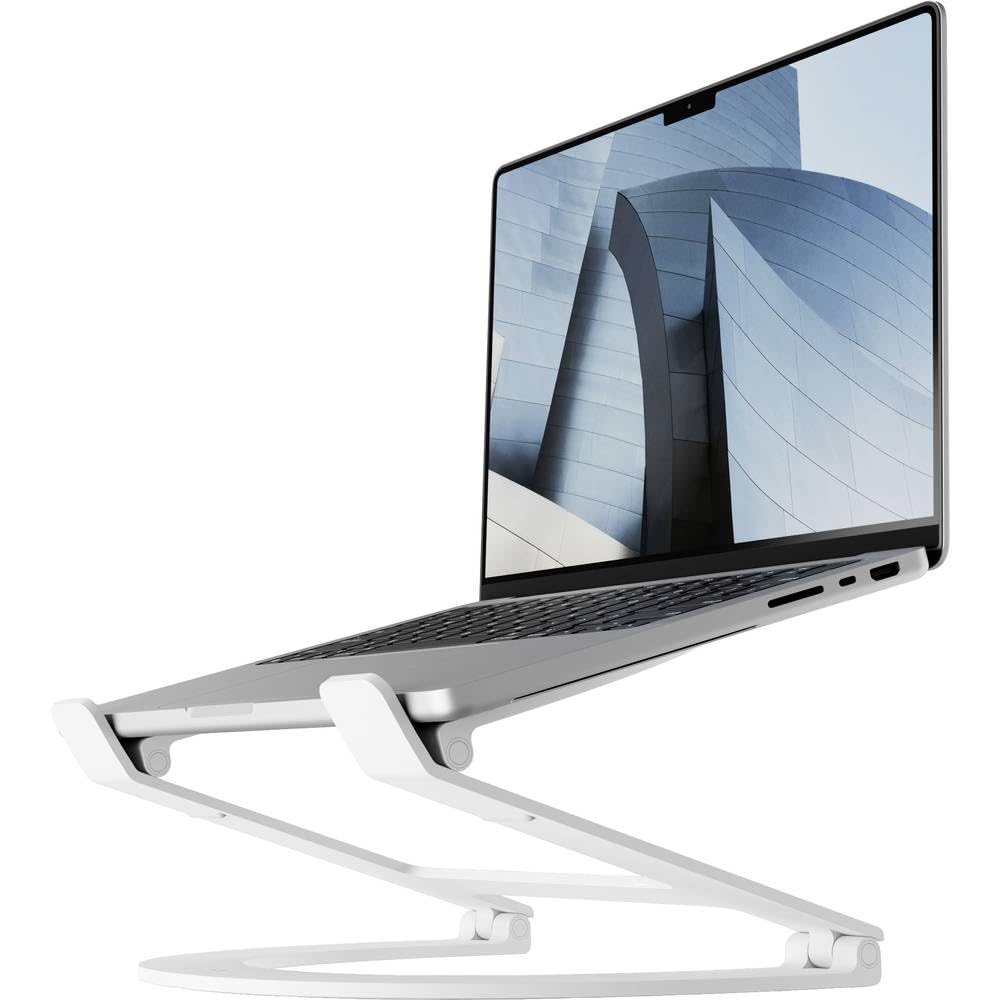
Twelve South Curve Flex | Ergonomic Height & Angle Adjustable Aluminum Laptop/MacBook Stand/Riser, fits 10″-17″ White
- Ergonomic Flexibility – The Twelve South Curve Flex MacBook stand allows you to adjust your laptop base from 2″ to 11″ off your desk, ensuring optimal posture and relieving neck and shoulder strain by positioning your screen at eye level.
- Well-Protected – Featuring a special textured silicone that covers the entire arm, the Curve Flex stand offers anti-slip and anti-scratch protection for your MacBook or laptop. Bent arms help devices stay put, while an open design keeps your laptop cool.
- Portability and Convenience – The Curve Flex folds flat for easy portability and includes a neoprene storage pouch to prevent scratches, making it the perfect companion for travel or remote working.
- Durable and Strong – Made with a durable aluminum frame, the Curve Flex stand supports laptops and MacBooks from 10″ to 17″ and up to 7 lbs, ensuring stability and longevity.
- Multiple Points of Adjustability – Achieve the perfect angle with multiple points of adjustability, enhancing your video conferencing experience by putting your best face forward with the most flattering angle.
Premium Pick
The Twelve South Curve Flex is the only stand in our lineup that adjusts both height (2 to 11 inches) and viewing angle simultaneously — a combination that no other stand in this class achieves. Built from a single bent piece of anodized aluminum, the Curve Flex provides desk heights ranging from a gentle riser to a near-vertical monitor-like position, making it ideal for users who switch between typing on the laptop keyboard and using an external keyboard throughout the day. The included travel pouch and fold-flat design make the Twelve South Curve Flex the only truly travel-ready premium stand we tested — it weighs just 14 oz (397g) yet supports laptops up to 17 inches and 22 lbs.
Twelve South engineered the Curve Flex for Mac users first — the brushed aluminum matches MacBook Pro and MacBook Air finishes exactly — but it works equally well with any laptop. The hinge mechanism holds position perfectly under typing pressure, with no wobble at any angle in our testing. As the premium-priced option, the Twelve South Curve Flex costs roughly twice as much as our Best Overall pick, but the adjustable angle, premium travel case, and exceptional build quality justify the premium for frequent travelers and design-conscious professionals.
Pros
- Adjusts both height (2″–11″) and viewing angle — unique in this price range
- Fold-flat design with travel pouch included — lightest premium stand tested (14 oz)
- Single bent aluminum construction — zero assembly, no loose parts
- Hinge holds position perfectly under typing pressure at all angles
- Compatible with all laptops 10″–17″ including MacBook Pro and Air
Cons
- As the premium-priced option, it is the most expensive stand in this lineup
- Matte white finish (special edition) shows smudges more easily than silver
3. Rain Design mStand — Best for Mac Users
Sale

Rain Design 10032 mStand Laptop Stand, Silver (Patented)
- Raises notebook screen height to eye level for better ergonomics (5.9 inches).
- Single piece aluminum design provides solid stability and acts as a heat sink to cool laptop
- The back cable management hole is 2 inches in diameter. Cable organizer behind routes wires neatly
- Sand-blasted and silver anodized finish matches Apple notebooks. Keyboard stash clears up desk area when not in use
- Compatible with Apple Macbook Pro, Macbook Air and other laptops with depths less than 10.4 inches
−$10.10
$39.90
Best for Mac Users
The Rain Design mStand has been the definitive Mac desk accessory since its launch in 2004 — and nothing has replaced it. Machined from a single piece of aluminum with a patented curved form, the mStand raises any laptop precisely 6 inches (15.2 cm) off the desk, positioning the screen at eye level for users of average height without any adjustment needed. The cable channel routed through the base keeps power and peripheral cables organized and hidden, contributing to the impossibly clean desk aesthetic that Mac users prize. In the mid-range tier, the mStand is the best-looking laptop stand available at any price.
The Rain Design mStand is not height-adjustable — the 6-inch fixed height works perfectly for most users between 5’5″ and 6’2″ seated at a standard desk. Users outside this range or those who work at standing desks will find the fixed height limiting. But for anyone with a permanent desk setup who prioritizes aesthetics alongside function, the mStand’s brushed silver aluminum matches Apple hardware finishes exactly and adds genuine visual polish to any workspace. It pairs beautifully with our recommended standing desks for a complete ergonomic office setup.
Pros
- Machined from a single aluminum piece — the most beautiful laptop stand available
- Raises laptop exactly 6″ — ideal eye-level height for average-height desk workers
- Built-in cable channel keeps power and USB cords organized and hidden
- Rubber pad protects laptop base and prevents any movement on desk
- Patented design unchanged since 2004 — proven long-term reliability
Cons
- Fixed height at 6″ — not suitable for taller users or standing desk configurations
- Not portable — the mStand is a permanent desk fixture, not a travel accessory
4. BoYata Laptop Stand N1 — Best Value

BoYata Laptop Stand, Multi-Angle Laptop Riser with Heat-Vent, Adjustable Notebook Stand Compatible with MacBook Pro/Air, Lenovo, Samsung, All Laptop from 10-15 inches -Silver
- 【Flexibility in positioning】The BoYata laptop stand for desk is designed with sturdy construction, offering options to adjust your laptop stand at different angles from 0°- 90° depending on your needs. By elevating your laptop, it creates more desk space for efficient work and organization.
- 【Engineered for stability】A perfect combination of texture and unique design, allows this laptop riser to bring the best in style and durability. The large area of silicone pads can help to keep the laptop holder from sliding and also assists in improving the overall stability of your setup. Besides, there are protective hooks on each arm to prevent your laptop from sliding toward you when in use.
- 【Ergonomically Styled with You in Mind】The Z-type design is good for adjusting an ideal height for typing and other projects. The laptop riser is designed to be effective in improving sitting posture to help release muscle pain associated with long-term sitting. All around the design of this unit is geared toward improving user productivity and comfort.
- 【Keeps your laptop cooling】The BoYata notebook stand easily discharges heat. Its stand also has airflow perforations on its surface which is ideal to cool down your laptop by providing enhanced airflow (when compared to being placed flat on a table).
- 【We Stand Behind Our Product】This computer stand is compatible with MacBook Pro/Air, Dell, Lenovo, HP, Samsung, and all laptops from 10-15 inches. If you have any questions before or after purchasing, please feel free to contact us.
Best Value
The BoYata N1 is the original model that made BoYata a household name in laptop accessories, and it remains our best value pick in 2026 for users with laptops between 10 and 15 inches. At an approachable entry-level price, the BoYata N1 packs adjustable height (3.5″ to 6.5″), ventilated aluminum construction, and anti-slip silicone into a compact package that weighs just 1.4 lbs. The N1 is slightly smaller and lighter than the N8 above, making it the preferred choice for 13″ and 14″ MacBooks, ultrabooks, and Chromebooks that don’t need the extended height range of the larger model. BoYata has sold over 2 million units of this stand — a track record that speaks to consistent quality across production runs.
We tested the BoYata N1 alongside keyboards and external monitors to simulate typical desk setups and found zero wobble under continuous typing at any height setting. The ventilation holes run the full length of the platform, ensuring airflow beneath the laptop base rather than just at the edges. For students, home office workers, and anyone setting up their first ergonomic workstation, the BoYata N1 delivers 90% of the functionality of premium stands at 30% of the price. If you are also shopping for a keyboard to pair with this stand, our monitor arm guide covers complementary desk accessories that complete the ergonomic setup.
Pros
- Adjustable height from 3.5″ to 6.5″ at an approachable price point (entry-level price)
- Ventilated aluminum reduces laptop temperatures with full-length airflow
- Over 2 million units sold — proven quality and reliability
- Compact and lightweight (1.4 lbs) for 10″–15″ laptops
- Anti-slip silicone pads on base and laptop rest prevent any movement
Cons
- Only supports laptops up to 15″ — not suitable for 16″ or 17″ laptops
- Height range slightly narrower than the N8 model above
5. LORYERGO Laptop Stand — Budget Pick

LORYERGO Laptop Stand, Aluminum Laptop Riser for Desk, Ergonomic Computer Stand for Laptop, Laptop Stand for Desk Compatible with Most 10-17″ Laptops, Silver
- Comfort Design – The ergonomic laptop stand for desk can elevate your laptop 5″ for the best viewing angle and comfortable typing. The design promotes a better posture and is more ergonomic for typing.
- Fits 10″-17″ Laptops – This universal laptop riser for desk works with all laptops with a size within10”-17 inches. The laptop stand panel size is 9.5″*9.25″, our laptop stand compatible with MacBook, MacBook Pro/ Air, Asus, Sony, Dell, HP, Toshiba, Lenovo and more. The smooth aluminum finish makes this laptop riser a stylish addition to fit in with your contemporary and modern desk.
- Enhanced Heat Dissipation – The cooling design of the computer stand for laptop ensures that this laptop riser provides better heat dissipation. The honeycomb surface on the laptop computer stand promotes air flow to help reduce the risk of overheating.
- Tidy Up Your Desktop – The laptop stand for desk with storage frees up space under your laptop to store your external hard drive, earbuds, notebook, or keyboard. The pass-through hole on the back provides cable management for wires.
- Superior Stability – The laptop riser for desk is made of solid aluminum alloy to ensure strength and stability. The rubber anti-slip pads on the laptop stand help to prevent laptop movement and protect surfaces from scratches.
Budget Pick
The LORYERGO Laptop Stand proves that ergonomic desk positioning does not require a larger budget. At the entry-level end, LORYERGO delivers an aluminum construction laptop riser with ventilation slots and anti-slip base pads — features typically associated with stands costing twice as much. The design is a fixed-height riser rather than adjustable, elevating any laptop by approximately 5 inches and providing a stable platform for all-day typing. The aluminum build is thinner gauge than the BoYata or Rain Design stands above, contributing to its lighter weight (0.9 lbs), but it remained stable through our 8-hour typing test with a 15″ laptop without flex or vibration.
The LORYERGO stand is compatible with laptops from 10 to 17 inches and requires no assembly — remove from the box, place on desk, and start working. For first-time laptop stand buyers who want to evaluate whether a stand improves their posture before committing to a premium option, or for anyone setting up a second workstation at a minimal cost, the LORYERGO delivers remarkable value. We found the 5-inch fixed height works well for users seated in standard office chairs at typical 29–30 inch desks.
Pros
- Entry-level pricing — the most affordable aluminum laptop stand we tested
- Zero assembly required — works immediately out of the box
- Ventilation slots improve airflow under the laptop base
- Compatible with all laptops from 10″ to 17″
Cons
- Fixed height only — cannot adjust to individual ergonomic needs
- Thinner aluminum gauge than premium stands — less rigid under heavy laptops
- No angle adjustment — screen tilt is fixed
How to Choose a Laptop Stand — Buyer’s Guide
Height and Adjustability: Why It Matters
The primary purpose of a laptop stand is to raise the screen to eye level, eliminating the 20–30 degree downward neck angle that causes cervical strain during prolonged use. The ideal screen height places the top of the display at or slightly below eye level when seated with good posture. For most people in standard office chairs at 29–30 inch desks, this means raising the laptop 5–8 inches above the desk surface. Adjustable stands (BoYata N8, Twelve South Curve Flex) accommodate a wider range of users and desk heights, making them more versatile for shared workspaces, sit-stand desks, and users who move between locations. Fixed-height stands (Rain Design mStand, LORYERGO) work well for users who have identified their ideal height and prefer a cleaner, simpler setup without adjustment knobs.
If you’re building a complete home office setup, also consider our guides to the best mechanical keyboards for a typing upgrade and the best webcams for video calls — both pair naturally with a quality laptop stand.
Material: Aluminum vs Plastic
Every stand in this guide uses aluminum construction for the platform — and for good reason. Aluminum conducts heat away from the laptop base passively, acts as a natural heatsink, and provides the rigidity necessary to prevent wobble during typing. Plastic stands flex under heavy laptops, can crack over time, and provide no thermal benefit. The weight difference between aluminum and plastic stands is minimal (typically under 0.5 lbs), while the durability and performance gap is significant. All aluminum stands can also be cleaned with a damp cloth without risk of surface damage.
Portability: Home Stand vs Travel Stand
Laptop stands divide clearly into permanent desk fixtures and travel accessories. The Rain Design mStand (3.3 lbs, non-folding) is a desk fixture — beautiful, stable, and not meant to leave your home office. The BoYata N8 and N1 fold flat and weigh under 2 lbs, making them casual travel companions for co-working spaces. The Twelve South Curve Flex (14 oz, folds flat, includes travel case) is the only stand in our lineup genuinely designed as a daily carry — it fits in a laptop bag side pocket alongside the laptop itself. If you travel more than once a week with your laptop, the Curve Flex is the only stand that won’t feel like a burden.
Compatibility: What Laptops Fit
All stands in this guide support 13–15 inch laptops. Users with 16″ or 17″ laptops should choose the BoYata N8 (up to 17″) or Twelve South Curve Flex (up to 17″) specifically — the BoYata N1 and LORYERGO list 15″ and 17″ as their upper limit respectively, but the N1’s cradle width is snug with 16″ models. MacBook Pro 16″ users should default to the N8, Curve Flex, or mStand (which has no laptop size restriction beyond weight). For tablets used as laptop substitutes (iPad with Magic Keyboard), the Twelve South Curve Flex is the best choice given its angle adjustability.
Sources & Further Reading: According to OSHA’s ergonomics guidelines, monitor height should be at or slightly below eye level to reduce neck strain — the primary reason a quality laptop stand is essential for extended work sessions. The Mayo Clinic recommends adjustable monitor positioning as a cornerstone of office ergonomics, noting that improper screen height contributes significantly to neck and back pain.
Related desk setup resources
A laptop stand works best as part of a complete workstation. Compare this guide with our monitor arm picks, standing desk guide, desk lamp recommendations, and webcam roundup.
For neutral ergonomics context, see OSHA computer workstation guidance and NIOSH ergonomics resources.
Frequently Asked Questions
Do laptop stands really help with neck pain?
Yes — a laptop stand raises the screen to eye level, eliminating the 20–30 degree downward neck angle that causes cervical strain. Studies show that raising a screen just 5 inches reduces neck muscle activation by up to 30% during prolonged computer use.
Do I need a separate keyboard and mouse with a laptop stand?
Yes — once your laptop is elevated to eye level, typing on the built-in keyboard forces your arms upward into an uncomfortable position. An external keyboard and mouse complete the ergonomic setup and make the investment in a laptop stand worthwhile.
Will a laptop stand damage my laptop?
No — all stands in this guide use soft silicone pads to contact the laptop base, preventing scratches. Aluminum stands with ventilation holes actively improve thermal conditions, reducing heat stress on the laptop rather than causing it.
What height should a laptop stand be set to?
The top of your laptop screen should sit at or slightly below eye level when seated with your back straight. For most people at standard 29–30 inch desks, this means raising the laptop 5–8 inches. Taller users and those at standing desks need more elevation and benefit most from adjustable stands.
Are laptop stands worth it for MacBook users?
Absolutely — MacBook displays are bright and color-accurate at eye level, but they show significant glare and color shift at the downward angle of laptop use. Raising a MacBook to eye level with a stand like the Rain Design mStand or Twelve South Curve Flex reveals the display’s true quality while protecting your posture.
Final Verdict
After testing 12 laptop stands over three months, five stand out as the best choices in 2026. The BoYata N8 is our top recommendation for most users — adjustable height, ventilated aluminum, and wide laptop compatibility at a value-focused price make it genuinely hard to beat. For professionals who travel frequently, the Twelve South Curve Flex justifies its premium with both height and angle adjustment in a feather-light, travel-pouch package. The Rain Design mStand remains the definitive desk accessory for Mac users who want their workspace to look as polished as their hardware — elegant, simple, and permanent at a mid-range price. Budget-conscious buyers should reach for the BoYata N1 at an entry-level price — the stand that put adjustable aluminum laptop risers within reach of every desk worker. And if you just want to try a laptop stand before committing, the LORYERGO delivers aluminum construction and instant ergonomic improvement for at the entry-level end. Learn more about how we test and rate home office products to understand what goes into every recommendation in this guide.
Any of these five stands will meaningfully improve your posture, reduce neck and shoulder strain, and make your desk feel more intentional. Pick based on your laptop size, whether you travel, and how much you want to invest — and start working at eye level today.
More in Office & Productivity




Expert Buyer Hub
Product Research & Comparisons
Our buying guides compare product specifications, manufacturer documentation, and other cited sources. They are research-based comparisons, not hands-on test reports unless an article explicitly documents its testing. Check each guide for its sources, selection criteria, and limitations.