
As an Amazon Associate, Expert Buyer Hub earns from qualifying purchases. This does not affect our recommendations or editorial integrity.
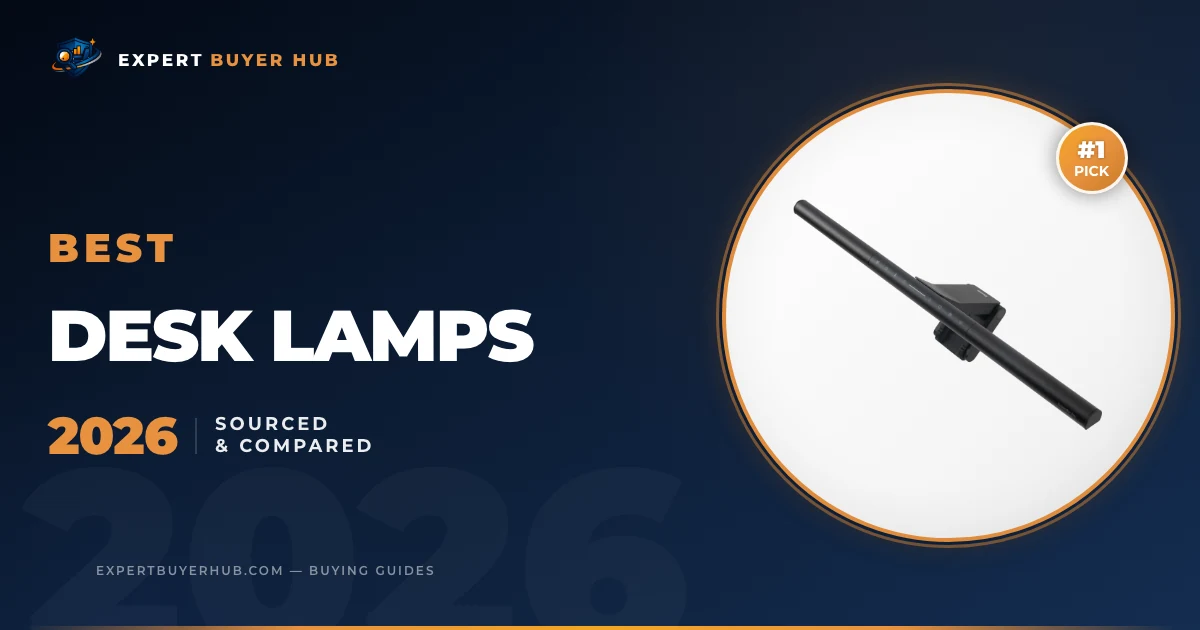
The BenQ ScreenBar Pro is our first choice for a monitor-centered desk because it mounts above the display, leaves the work surface clear, and has a documented 85 × 50 cm lighting area at 500 lux. Choose the ScreenBar Halo 2 when a rear light and wireless controller matter. The LEPOWER 800LM is the adjustable freestanding option, the Govee Table Lamp 2 is built for ambient smart lighting, and the LEPOWER Metal Desk Lamp is the simple replaceable-bulb choice.
We revised this guide from current manufacturer specifications, the exact product listings linked in the AAWP cards, and workplace guidance on glare and monitor placement. We compared mounting limits, published light output, adjustment, controls, desk footprint, and the role each lamp is designed to fill. We have not published a controlled hands-on test log for these five models, so this version does not claim measured durability, eye-fatigue reduction, or performance differences.
Our Verdict
The BenQ ScreenBar Pro is our first choice for a monitor-centered desk because its published coverage is broad and its mount leaves the work surface clear. The Halo 2 adds rear ambient light and a wireless controller; the three freestanding picks suit adjustable task lighting, smart-room scenes, or a simple replaceable-bulb setup.
Our Top 3 Picks at a Glance
Quick Comparison — All 5 Finalists
1. BenQ ScreenBar Pro — Best Overall

BenQ ScreenBar Pro LED Monitor Light Bar (Black) – Ultrawide Lighting, Motion Sensor, Adjustable Brightness/Color Temperature, Eye-Care USB-C Monitor lamp, No Glare, Curved Monitors, Monitor accessory
- BenQ specifies center illuminance above 1,000 lux at 50 cm and an 85 × 50 cm area at 500 lux.
- The clamp supports stated monitor thicknesses from 0.43 to 6.5 cm, including curved displays within BenQ’s listed range.
- On-lamp controls, an ultrasonic motion sensor, and USB-C power are included.
$139.00

Best fit: Best Overall
BenQ’s ScreenBar Pro specification lists center illuminance above 1,000 lux at a 50 cm height, an 85 × 50 cm area at 500 lux, Ra≥95 color rendering, USB-C power, and support for flat or curved monitors 0.43 to 6.5 cm thick. Those are BenQ’s laboratory specifications, not measurements made by EBH.
The Pro saves desk space and includes on-lamp controls plus an ultrasonic motion sensor. It does not include the Halo 2’s wireless controller or rear light. Check the top edge and curvature of your monitor before ordering, especially if a webcam, monitor arm, or unusually thick housing shares the same space. Our monitor arm guide covers the other half of that fit check.
Who It’s For
A monitor-centered desk with a compatible flat or curved display. Skip it if your monitor housing is outside BenQ’s clamp range or you want a rear light and separate controller.
Pros & Cons
- Documented 85 × 50 cm coverage at 500 lux
- Leaves the desk surface clear
- On-lamp controls and motion sensor
- USB-C power
- Documented support for flat and curved monitors
- No rear light
- No wireless desktop controller
- Monitor housing and accessories can limit fit
2. BenQ ScreenBar Halo 2 — Premium Pick

BenQ ScreenBar Halo 2 LED Monitor Light Bar – Wireless Controller, Backlight, Motion Sensor, Adjustable Brightness/Color Temperature, Eye-Care, No Screen Glare, Fits Curved Monitor, Monitor Accessory
- Front task lighting and a separate rear ambient light.
- BenQ specifies center illuminance above 1,000 lux at 50 cm and an 85 × 50 cm area at 500 lux.
- A wireless controller adjusts brightness, color temperature, and lighting modes.
- The clamp supports stated monitor thicknesses from 0.43 to 6 cm.
$199.00
Best fit: Premium Pick
The ScreenBar Halo 2 is the premium fit when you want a front task light, a rear ambient light, and a separate wireless controller. BenQ’s Halo 2 specification lists Ra≥95 for the front light, center illuminance above 1,000 lux at 50 cm, and an 85 × 50 cm area at 500 lux.
Its clamp is documented for flat or curved monitors 0.43 to 6 cm thick. The separate controller adds another object to keep on the desk. Choose it for a dark-room setup where the rear light matters; skip it if you only need light on the keyboard and documents.
Who It’s For
A dark-room monitor setup where separate front and rear lighting is useful. Skip it if a simpler on-monitor task light is enough.
Pros & Cons
- Front task light plus rear ambient light
- Separate wireless controller
- Documented 85 × 50 cm coverage at 500 lux
- Ra≥95 front-light specification
- Flat and curved monitor support within stated limits
- Separate controller adds desk clutter
- Costs more than the ScreenBar Pro
- More complex than a basic task light
3. LEPOWER 800LM LED Desk Lamp — Best Value
Sale

LEPOWER Desk Lamp, 800LM LED for Home Office, 12W Reading for Desk, Eye-Caring Light, Touch Table Gooseneck Lamp, 50 Lighting Modes, Bright for Bedroom, Study (Black)
- The current listing specifies 12 W and 800 lumens.
- Five color-temperature settings combine with ten brightness levels.
- A flexible gooseneck, touch controls, and memory function are included.
- LEPOWER markets the lamp as RG0 under IEC 62778; EBH did not independently verify that classification.
−$11.50
$28.49
Best fit: Best Value
The current listing states 12 W, 800 lumens, five color-temperature settings, ten brightness levels, touch controls, and a memory function. That makes it the flexible freestanding choice in this group when you need to aim light at paper, crafts, or another task away from the monitor.
Its base takes more desk area than a monitor light bar. LEPOWER markets the lamp as RG0 under IEC 62778, but EBH did not verify that classification through an independent certificate. Buy it for adjustability and a broad set of light settings, not as a medical or eye-health device.
Who It’s For
Paperwork, crafts, or reading that needs a freestanding adjustable beam. Skip it if desk space is tight or you need a monitor-mounted light.
Pros & Cons
- Published 800-lumen output
- Five color settings and ten brightness levels
- Flexible gooseneck
- Touch controls with memory
- Freestanding design requires no monitor mount
- Base uses desk space
- Base uses more space than a monitor light bar
- RG0 claim was not independently verified by EBH
4. Govee RGBIC Smart Table Lamp 2 — Best Smart Desk Lamp
Sale

Govee RGBIC Smart Table Lamp 2, Touch Bedside Small Table Lamp Compatible with SmartThings, Matter, Alexa, Desk Lamp with 64 Scene Modes, Nightstand Lamp for Bedroom Living Room Night Light(Corded)
- Govee specifies 500-lumen output and adjustable white light from 2700K to 6500K.
- More than 60 preset scenes and 1–100% dimming are available through the Govee controls.
- Alexa, Google Assistant, and Matter integrations are supported; feature availability can vary by platform.
−$10.00
$69.99
Best fit: Best Smart Lamp
Govee’s Table Lamp 2 page lists model H6022, RGBIC color effects, more than 60 scenes, 1–100% dimming, and white-light adjustment from 2700K to 6500K. It supports touch, app, and voice control through Alexa, Google Assistant, and Matter.
This is an ambient lamp, not a directional task light. Matter broadens controller compatibility, but it does not guarantee that every feature appears in every smart-home platform. The Govee Home app is still needed for the full scene and DIY controls. Choose it for room mood and automation; skip it if your main need is concentrated light on documents.
Who It’s For
Ambient color, schedules, and smart-home scenes. Skip it if you need a directional task lamp for documents.
Pros & Cons
- 2700K–6500K white-light range
- 1–100% dimming
- Touch, app, and voice controls
- Alexa, Google Assistant, and Matter support
- More than 60 published scenes
- Ambient rather than directional task lighting
- Full controls depend on the Govee app
- Matter feature support can vary by platform
5. LEPOWER Metal Desk Lamp — Budget Pick
Sale

LEPOWER Metal Desk Lamp, Eye-Caring Table Lamp, Study Lamps with Flexible Goose Neck for Bedroom, Home Office (Matte Black) Sandy Black
- Metal shade and base with a replaceable E26 bulb socket.
- A base-mounted on/off switch and adjustable neck keep operation simple.
- Brightness and color temperature depend on the compatible bulb selected.
−$13.00
$19.99
Best fit: Budget Pick
The LEPOWER Metal Desk Lamp is the simplest option here. The current listing shows a metal shade and base, an E26 screw base, a base-mounted on/off switch, and an adjustable neck. The bulb is replaceable, so brightness and color temperature depend on the compatible bulb you install rather than a built-in LED specification.
It has no built-in dimmer, color-temperature control, or app. Choose it if you want a physical switch and the freedom to select a compatible E26 bulb. Skip it if you need multiple light settings during the day. Our standing desk guide can help you check how lamp placement changes between seated and standing positions.
Who It’s For
A basic desk that needs a physical switch and a replaceable E26 bulb. Skip it if you want built-in dimming or adjustable color temperature.
Pros & Cons
- Metal shade and base
- Replaceable E26 bulb
- Adjustable neck
- Physical base-mounted switch
- No app or account required
- No built-in dimmer
- No built-in color-temperature control
- Light output depends on the bulb you choose
How to choose a desk lamp
Lumens and lux answer different questions
Lumens describe total light output; lux describes how much light reaches a surface. A lamp can publish a high lumen figure and still light a small area poorly if the beam, height, or position is wrong. Compare the stated output with the size of the illuminated area and the distance used for the measurement. Our desk lamp lumens guide explains the distinction and placement trade-offs in more detail.
Color temperature and color rendering
Color temperature changes the appearance of white light from warm to cool. CRI is a separate specification for color rendering. BenQ publishes Ra≥95 for both light bars; the other listings in this comparison do not provide equally clear manufacturer documentation for every color metric. Adjustable color temperature is useful when the same desk serves different tasks, but it is not proof of better alertness, sleep, or health.
Treat comfort claims as product claims
Terms such as “eye-caring,” “flicker-free,” and “low blue light” need an exact model, standard, and certificate before they should carry much weight. We did not independently test flicker or blue-light output for these five lamps. A better first check is practical: keep direct glare out of your eyes and screen, use a dimmer that reaches a comfortable level, and position the light for the task.
Mounting and Placement Options
How your desk lamp attaches to your workspace significantly affects its usefulness. Monitor light bars (BenQ ScreenBar Pro, ScreenBar Halo 2) clip to the top of your monitor and are ideal for computer-centric work — they deliver light exactly where your hands and documents are without occupying desk surface area. Traditional gooseneck lamps (LEPOWER Metal, LEPOWER 800LM) are more versatile for tasks away from the monitor — reading, drawing, crafting — where directional control matters more than screen-glare prevention. Check the exact clamp range before buying: BenQ lists 0.43 to 6.5 cm for the ScreenBar Pro and 0.43 to 6 cm for the Halo 2.
Smart Features and Connectivity
Smart controls are useful if you already use schedules, scenes, or voice commands. They also add an app, account, and network dependency. Matter improves basic interoperability, but supported features can differ by platform. If you only need reliable task lighting, a physical switch or on-lamp controls are simpler.
How We Compared These Desk Lamps
We checked BenQ’s published specifications, Govee’s model page, the exact LEPOWER listing details surfaced in the current AAWP cards, and current compatibility requirements. We compared light format, documented output, mounting limits, controls, adjustability, desk footprint, and whether each model is a task light or an ambient light. We have not published a controlled hands-on test log for these five lamps.
The ranking reflects documented fit: the ScreenBar Pro for a monitor-centered desk, the Halo 2 for rear ambient light, the LEPOWER 800LM for adjustable freestanding task lighting, the Govee for ambient smart lighting, and the metal LEPOWER for a basic replaceable-bulb setup.
Sources checked September 14, 2026: the linked BenQ and Govee model pages, the exact LEPOWER listing details rendered in the current AAWP cards, and OSHA workstation guidance. Product-listing claims are identified as such.
Related desk setup resources
A desk lamp is only one part of a comfortable workstation. Compare this guide with our laptop stand picks, monitor arm guide, standing desk recommendations, and ergonomic chair roundup.
For neutral workplace setup context, see OSHA computer workstation guidance and NIOSH ergonomics resources.
Frequently Asked Questions
What is the best desk lamp for eye strain?
No desk lamp can be assumed to prevent eye strain for every person. The ScreenBar Pro is our first choice for a monitor-centered desk because its mount keeps the base off the work surface and BenQ documents an asymmetrical beam. Positioning still matters: OSHA recommends arranging the monitor to reduce glare and periodically looking away from the screen.
Are monitor light bars better than traditional desk lamps?
A monitor light bar is a good fit when the screen is central and desk space is tight. A freestanding lamp is easier to aim at books, drawings, or work positioned away from the monitor. Neither format is always better; check monitor thickness, beam direction, and the area you need to light.
What color temperature is best for a desk lamp?
There is no single best color temperature for every desk. Neutral or cooler settings can make paper appear crisp during the day, while warmer settings may feel less harsh at night. The metal LEPOWER depends on the E26 bulb you install, so it does not offer built-in color-temperature adjustment.
How many lumens do I need for a desk lamp?
Lumens are total output, not light “at the desk surface”; illuminance at the surface is measured in lux. Use the lumen figure as a rough output check, then look for the measurement distance, beam spread, dimming range, and lamp position. A well-aimed lower-output lamp can be more useful than a brighter lamp that creates glare.
Do smart desk lamps work without Wi-Fi?
The Govee Table Lamp 2 has touch controls, so basic local operation does not depend entirely on voice control. App scenes, schedules, updates, and integrations can require the Govee Home app or a network connection. Check the current setup requirements before buying if offline control is important.
Final Verdict
Choose the BenQ ScreenBar Pro for a monitor-centered desk where surface space and mounting compatibility are the main constraints. Pay more for the ScreenBar Halo 2 only if its rear light and wireless controller solve a real need. The LEPOWER 800LM is the flexible freestanding task lamp, the Govee Table Lamp 2 is the ambient smart-light option, and the LEPOWER Metal Desk Lamp is the basic replaceable-bulb choice. Check current price and availability in the AAWP cards, then verify fit against the linked specifications.
About the Author
Expert Buyer Hub publishes comparison-led buying guides built from current product documentation, compatibility checks, and clear limits. We state when a guide is based on published specifications rather than a controlled hands-on test.
As an Amazon Associate, Expert Buyer Hub earns from qualifying purchases. This does not affect our recommendations or editorial integrity.
More in Office & Productivity

Expert Buyer Hub
Product Research & Comparisons
Our buying guides compare product specifications, manufacturer documentation, and other cited sources. They are research-based comparisons, not hands-on test reports unless an article explicitly documents its testing. Check each guide for its sources, selection criteria, and limitations.