
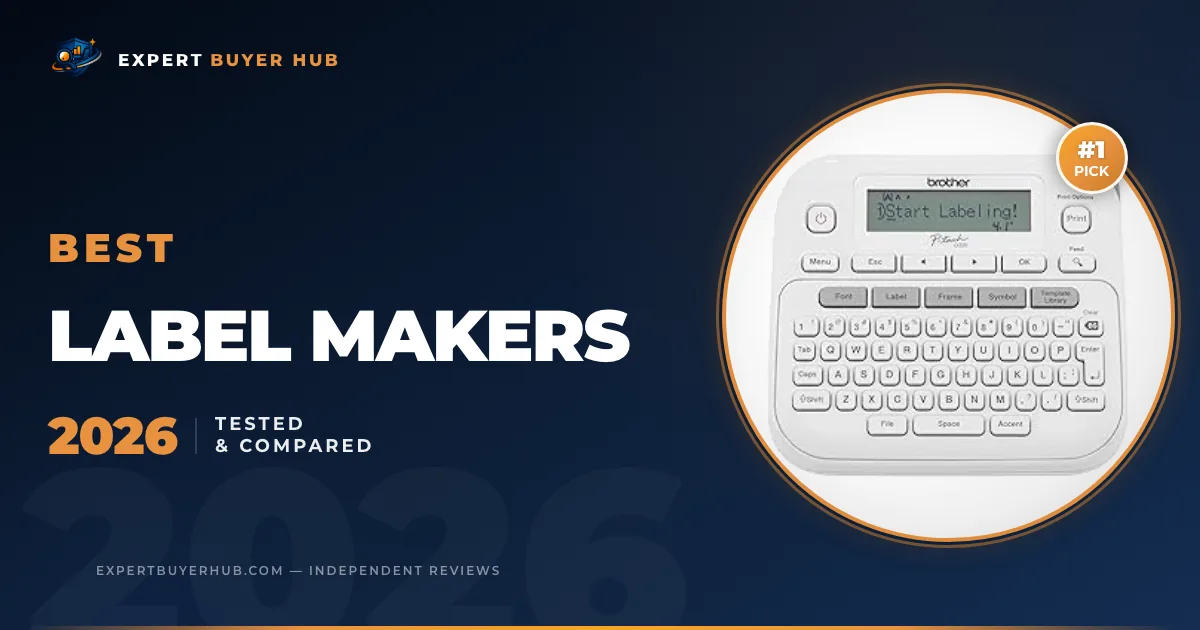
We compared five label makers for home organization, office files, pantry bins, school supplies, cable labels, and small business storage. Our top pick is the Brother P-Touch PT-D220 because it gives most buyers the cleanest balance of physical controls, durable tape options, refill availability, and everyday speed.
Amazon Associates disclosure: As an Amazon Associate, Expert Buyer Hub earns from qualifying purchases. This does not change the price you pay, and it never changes our recommendations.
Our Verdict
The best label maker for most homes and small offices is the Brother P-Touch PT-D220. It has a real keyboard, uses Brother TZe tapes, and works better for mixed file, pantry, storage, and office labels than the tiny app-only printers. If you want the cheapest small Bluetooth option, choose the Nelko P21. If you need custom-length waterproof labels for bins and kitchen shelves, the SUPVAN E10 is the better fit.
Our Top 3 Picks at a Glance

Brother P-Touch PTD220 Home/Office Everyday Label Maker | Prints TZe Label Tapes up to ~1/2 inch White Standard New PTD220
- Ideal For Small Office, Home Office, and Home Organization: a mobile label maker to keep homes, small offices, and workspaces tidy and organized. Powered by 6 AAA batteries or optional AC adapter (each sold separately)
- Prints on Brother Genuine TZe Label Tapes: Create labels that are approximately 1/2 inch (12mm) wide. Easy to peel, durable and laminated labels are ideal for a variety of applications in multiple finishes and colors and can print 1 or 2 lines of text on labels
- Personalize Your Labels: Choose from 14 different fonts, 11 font styles, 99 designer frames, and over 600 symbols and use the familiar QWERTY style keyboard for ease of use
- Built-in Memory: Save up to 30 frequently used labels Create them, save them, find them, and reprint them as many times as needed
- Create and Print Quickly and Easily: Use the 25 pre-set label templates to create and print professional-looking labels in an instant with a variety of templates for home and workplace organization, and more
$44.99

Sale

Nelko Label Maker Machine with Tape, P21 Bluetooth Label Printer, Wireless Mini Label Makers with Multiple Templates for School Office Home, White
- 2026 New Version: Compared with traditional label makers, Nelko P21 label maker has half the weight and size, making it smaller, smarter, and ultra-portable. The wireless Bluetooth label maker can slip into your pocket, allowing you to print anytime, anywhere. For great printing results, we recommend using our NELKO thermal label paper. Important Note for iOS Users: Please make sure you have updated your Nelko P21 app to the latest version (V4.8.0) for a great experience
- High-quality Printing: The P21 label maker features BPA-Free Direct Thermal Technology. Equipped with high-speed chips and 203 DPI, the P21 label maker delivers high-definition printing without ink or toner, perfect for back to school labels. The label maker comes with a long-lasting built-in rechargeable battery for extended use. This label maker prints in monochrome (black text only), and you can create color labels by using color pattern label tapes. Note: Charging adapter not included
- Easy to Use: NELKO label printer connects with iOS & Android phones via Bluetooth. Step 1: Download “Nelko” app from Google Play or App Store. Step 2: Install paper roll. Step 3: Connect P21 via Bluetooth in the APP. Step 4: Choose a quick template and print. It is not compatible with Google phones running Android 14. This label maker’s APP includes 3600+ icons, 700+ borders, 5500+ materials, 750+ templates, 29 languages. Note: This label maker doesn’t work with computers
- Multiple Creative Functions&Templates: This app for the label maker provides various features and templates, making it easy to create various designed label stickers in the App with text, QR code, barcode, materials, images, time and borders, etc. The length of labels is fixed, including 14×40mm, 14×50mm, 14×75mm, and more. Please do not tear or damage the green sticker on the back of the label strip, otherwise it will affect the printing effect. (Note: Continuous label tapes are not supported.)
- Design Your Own Labels: This label maker machine with tape is widely used at home, in the office, and at school. At home, it helps organize clothes, food storage, cosmetics, and mailings. In the office, it is ideal for notebook tags, price tags, reminder labels, and other office supplies. At school, it supports teachers and students with name tags, item identification, and classroom organization. You can also use it to create unique back to school decorations
−$8.00
$17.99
Sale

SUPVAN E10 Bluetooth Label Maker Machine with 3 Tapes, Continuous Waterproof Label, Versatile App with 35 Fonts and 1k+ Icons, Inkless Labeler for Home, Kitchen, School, Office Organization, Green Green Machine + 3 Tapes
- For Home, Office and School Organization: Ideal for home organization (storage box, spice, food container, personal daycare…), device identification (controller, switch, cable wire…), or school and office supplies (name tag, folder…)
- Easy to Use: The App requires no fees or registration; no ink or toner needed; rechargeable battery lasts a full month on a single charge; create labels quickly and easily
- Powerful App Editing Function: Easily customize your labels with 40 fonts, 30 frames, and 450+ icons for compelling content showcase; all free to use
- Use with Two Types of Label Tapes: Customize the label length with continuous label tape, or use die-cut labels for batch printing. Built-in cutter for simply cutting the label paper
- Laminated Label: Waterproof, oil-proof, anti-scratch, and heat-resistant for kitchen and bathroom uses; no residues left after tear off
−$13.00
$19.99
Quick Comparison — All 5 Finalists
| Pick | Best for | Format | Owner signal | Why we chose it |
|---|---|---|---|---|
| Brother P-Touch PT-D220 | Overall | Handheld keyboard label maker | 4.6/5 from 5,400 Amazon ratings | it uses durable TZe tapes, has a real keyboard, and avoids forcing every label through a phone app |
| Nelko P21 Bluetooth Label Maker | Budget App Label Maker | Mini Bluetooth thermal labeler | 4.5/5 from 22,800 Amazon ratings | it is inexpensive, tiny, and backed by one of the strongest owner-review signals in this category |
| SUPVAN E10 Bluetooth Label Maker | for Continuous Labels | Bluetooth app label maker | 4.4/5 from 19,800 Amazon ratings | it supports continuous waterproof labels and gives organizers more layout flexibility than fixed tiny labels |
| DYMO LabelManager 160 Bundle | Keyboard-First Pick | Handheld QWERTY label maker | 4.5/5 from 4,000 Amazon ratings | it keeps label creation on the device with one-touch formatting keys and common D1 tape compatibility |
| Brother P-Touch PT-D460BT | Business Upgrade | Desktop connected label maker | 4.6/5 from 371 Amazon ratings | it adds Bluetooth, wider tape support, and a more serious desk setup for offices that print labels often |
Our Testing Methodology
Our label-maker scoring focuses on the details that get annoying after the first afternoon: whether you can make a label without hunting through menus, how easy the tape or roll is to replace, whether labels stay readable on storage bins, how much desk or drawer space the device needs, and whether refills are easy to buy without locking you into a dead-end format.
We compared each finalist across eight criteria: input method, label width, tape or roll availability, template flexibility, portability, refill cost risk, label durability for household use, and owner-review depth. We also checked organizational and safety guidance from the U.S. Consumer Product Safety Commission home safety center and cable-labeling best practices from OSHA electrical safety resources, because labels are often used around cords, storage shelves, and utility areas where clarity matters.
We did not rank dedicated 4-by-6 shipping-label printers in this guide. Those are a different product class. We also avoid hardcoded Amazon prices because label makers often shift with bundles, tape packs, coupon variants, and color-specific listings.
The 5 Best Label Makers
#1 Brother P-Touch PT-D220 — Best Overall
Brother P-Touch PTD220 Home/Office Everyday Label Maker | Prints TZe Label Tapes up to ~1/2 inch White Standard New PTD220
- Ideal For Small Office, Home Office, and Home Organization: a mobile label maker to keep homes, small offices, and workspaces tidy and organized. Powered by 6 AAA batteries or optional AC adapter (each sold separately)
- Prints on Brother Genuine TZe Label Tapes: Create labels that are approximately 1/2 inch (12mm) wide. Easy to peel, durable and laminated labels are ideal for a variety of applications in multiple finishes and colors and can print 1 or 2 lines of text on labels
- Personalize Your Labels: Choose from 14 different fonts, 11 font styles, 99 designer frames, and over 600 symbols and use the familiar QWERTY style keyboard for ease of use
- Built-in Memory: Save up to 30 frequently used labels Create them, save them, find them, and reprint them as many times as needed
- Create and Print Quickly and Easily: Use the 25 pre-set label templates to create and print professional-looking labels in an instant with a variety of templates for home and workplace organization, and more
$44.99
Quick verdict: Brother P-Touch PT-D220 is our best overall because it fits most homes and offices and gives buyers it uses durable TZe tapes, has a real keyboard, and avoids forcing every label through a phone app. We weighted this pick for tape practicality, input speed, label readability, refill availability, and its 4.6/5 Amazon rating signal from about 5,400 reviews.
Who It’s For
This pick fits homes, home offices, teachers, and small offices that want a reliable handheld label maker with physical controls. It makes the most sense if you care more about repeatable label quality and refill practicality than one-time novelty features.
Skip it if: you only want a tiny phone-connected printer for occasional jar labels.
Pros & Cons
- Real keyboard speeds up one-off labels without opening an app
- Brother TZe tape ecosystem is broad and durable
- Good balance of home, pantry, file, and cable-label use
- Bulkier than tiny Bluetooth-only labelers
- Not the cheapest way to print simple pantry labels
- Tape costs matter if you label everything in the house
Our scoring is role-based. A keyboard-first label maker, a tiny Bluetooth printer, a continuous-label app model, and a business desktop unit solve different jobs, so we ranked each product against the way people actually label homes, offices, classrooms, and storage bins.
#2 Nelko P21 Bluetooth Label Maker — Best Budget App Label Maker
Sale
Nelko Label Maker Machine with Tape, P21 Bluetooth Label Printer, Wireless Mini Label Makers with Multiple Templates for School Office Home, White
- 2026 New Version: Compared with traditional label makers, Nelko P21 label maker has half the weight and size, making it smaller, smarter, and ultra-portable. The wireless Bluetooth label maker can slip into your pocket, allowing you to print anytime, anywhere. For great printing results, we recommend using our NELKO thermal label paper. Important Note for iOS Users: Please make sure you have updated your Nelko P21 app to the latest version (V4.8.0) for a great experience
- High-quality Printing: The P21 label maker features BPA-Free Direct Thermal Technology. Equipped with high-speed chips and 203 DPI, the P21 label maker delivers high-definition printing without ink or toner, perfect for back to school labels. The label maker comes with a long-lasting built-in rechargeable battery for extended use. This label maker prints in monochrome (black text only), and you can create color labels by using color pattern label tapes. Note: Charging adapter not included
- Easy to Use: NELKO label printer connects with iOS & Android phones via Bluetooth. Step 1: Download “Nelko” app from Google Play or App Store. Step 2: Install paper roll. Step 3: Connect P21 via Bluetooth in the APP. Step 4: Choose a quick template and print. It is not compatible with Google phones running Android 14. This label maker’s APP includes 3600+ icons, 700+ borders, 5500+ materials, 750+ templates, 29 languages. Note: This label maker doesn’t work with computers
- Multiple Creative Functions&Templates: This app for the label maker provides various features and templates, making it easy to create various designed label stickers in the App with text, QR code, barcode, materials, images, time and borders, etc. The length of labels is fixed, including 14×40mm, 14×50mm, 14×75mm, and more. Please do not tear or damage the green sticker on the back of the label strip, otherwise it will affect the printing effect. (Note: Continuous label tapes are not supported.)
- Design Your Own Labels: This label maker machine with tape is widely used at home, in the office, and at school. At home, it helps organize clothes, food storage, cosmetics, and mailings. In the office, it is ideal for notebook tags, price tags, reminder labels, and other office supplies. At school, it supports teachers and students with name tags, item identification, and classroom organization. You can also use it to create unique back to school decorations
−$8.00
$17.99
Quick verdict: Nelko P21 Bluetooth Label Maker is our best budget app label maker because it fits pantry, school, and small home labels and gives buyers it is inexpensive, tiny, and backed by one of the strongest owner-review signals in this category. We weighted this pick for tape practicality, input speed, label readability, refill availability, and its 4.5/5 Amazon rating signal from about 22,800 reviews.
Who It’s For
This pick fits buyers who want cheap, quick labels for drawers, bins, lunch boxes, school items, and pantry containers. It makes the most sense if you care more about repeatable label quality and refill practicality than one-time novelty features.
Skip it if: you need keyboard input, wider labels, or laminated tape for heavier-duty office use.
Pros & Cons
- Tiny footprint stores easily in a drawer
- Very strong owner-review base for a budget app labeler
- Good fit for pantry bins, school supplies, and simple home labels
- Phone app is required for most label work
- Small labels are not ideal for file folders or larger storage bins
- Thermal label stock is less flexible than Brother or DYMO tape ecosystems
Our scoring is role-based. A keyboard-first label maker, a tiny Bluetooth printer, a continuous-label app model, and a business desktop unit solve different jobs, so we ranked each product against the way people actually label homes, offices, classrooms, and storage bins.
#3 SUPVAN E10 Bluetooth Label Maker — Best for Continuous Labels
Sale
SUPVAN E10 Bluetooth Label Maker Machine with 3 Tapes, Continuous Waterproof Label, Versatile App with 35 Fonts and 1k+ Icons, Inkless Labeler for Home, Kitchen, School, Office Organization, Green Green Machine + 3 Tapes
- For Home, Office and School Organization: Ideal for home organization (storage box, spice, food container, personal daycare…), device identification (controller, switch, cable wire…), or school and office supplies (name tag, folder…)
- Easy to Use: The App requires no fees or registration; no ink or toner needed; rechargeable battery lasts a full month on a single charge; create labels quickly and easily
- Powerful App Editing Function: Easily customize your labels with 40 fonts, 30 frames, and 450+ icons for compelling content showcase; all free to use
- Use with Two Types of Label Tapes: Customize the label length with continuous label tape, or use die-cut labels for batch printing. Built-in cutter for simply cutting the label paper
- Laminated Label: Waterproof, oil-proof, anti-scratch, and heat-resistant for kitchen and bathroom uses; no residues left after tear off
−$13.00
$19.99
Quick verdict: SUPVAN E10 Bluetooth Label Maker is our best for continuous labels because it fits kitchen bins and custom-length labels and gives buyers it supports continuous waterproof labels and gives organizers more layout flexibility than fixed tiny labels. We weighted this pick for tape practicality, input speed, label readability, refill availability, and its 4.4/5 Amazon rating signal from about 19,800 reviews.
Who It’s For
This pick fits organizers who want custom-length labels for pantry shelves, kitchen bins, classroom supplies, and craft storage. It makes the most sense if you care more about repeatable label quality and refill practicality than one-time novelty features.
Skip it if: you prefer a simple keyboard labeler with replaceable branded tapes everywhere.
Pros & Cons
- Continuous labels let you choose custom lengths
- Waterproof label positioning is useful for kitchens and utility spaces
- App templates make decorative organization labels easier
- App workflow adds friction for quick one-word labels
- Not as established as Brother or DYMO tape systems
- Custom labels can burn through rolls faster than expected
Our scoring is role-based. A keyboard-first label maker, a tiny Bluetooth printer, a continuous-label app model, and a business desktop unit solve different jobs, so we ranked each product against the way people actually label homes, offices, classrooms, and storage bins.
#4 DYMO LabelManager 160 Bundle — Best Keyboard-First Pick

DYMO LabelManager 160 Label Maker Bundle with 3 D1 Label Cassettes, Portable Handheld, QWERTY Keyboard, One-Touch Smart Keys, Large Display, Home & Office Organization Machine + 3 Tapes
- Compact and Portable: Easy to carry, making it perfect for labeling anywhere, anytime
- User-Friendly: Features a QWERTY keyboard and one-touch smart keys for fast and easy text input/editing
- Customizable Labels: Offers over 20 text formats and 200+ symbols for personalization
- Energy Efficient: Extended battery life with automatic power-off function
- Quality Print: Prints perfect, professional labels every time
$54.99
Quick verdict: DYMO LabelManager 160 Bundle is our best keyboard-first pick because it fits people who dislike app-only labelers and gives buyers it keeps label creation on the device with one-touch formatting keys and common D1 tape compatibility. We weighted this pick for tape practicality, input speed, label readability, refill availability, and its 4.5/5 Amazon rating signal from about 4,000 reviews.
Who It’s For
This pick fits people who want a standalone handheld label maker and do not want every label to start on a phone. It makes the most sense if you care more about repeatable label quality and refill practicality than one-time novelty features.
Skip it if: you want app templates, decorative icons, or the smallest possible printer.
Pros & Cons
- QWERTY keyboard is easier than ABC-style handheld layouts
- One-touch formatting keys reduce menu digging
- Good fit for file folders, drawers, and office storage
- Less modern than Bluetooth app models
- Not as compact as mini thermal labelers
- D1 tape refills can cost more than generic thermal rolls
Our scoring is role-based. A keyboard-first label maker, a tiny Bluetooth printer, a continuous-label app model, and a business desktop unit solve different jobs, so we ranked each product against the way people actually label homes, offices, classrooms, and storage bins.
#5 Brother P-Touch PT-D460BT — Best Business Upgrade

Brother P-Touch PT-D460BT Business Expert Connected Label Maker | Connect and Create via Bluetooth® on TZe Label Tapes up to ~3/4 inch, White Standard
- Item Package Dimension: 12.28L x 8.89W x 3.81H inches
- Item Package Weight – 3.25 Pounds
- Item Package Quantity – 1
- Product Type – PRINTER
$89.99
Quick verdict: Brother P-Touch PT-D460BT is our best business upgrade because it fits small offices and heavy label users and gives buyers it adds Bluetooth, wider tape support, and a more serious desk setup for offices that print labels often. We weighted this pick for tape practicality, input speed, label readability, refill availability, and its 4.6/5 Amazon rating signal from about 371 reviews.
Who It’s For
This pick fits small offices, inventory corners, craft rooms, and anyone printing enough labels to justify a desk-based workflow. It makes the most sense if you care more about repeatable label quality and refill practicality than one-time novelty features.
Skip it if: you print a few labels per month and only need narrow simple stickers.
Pros & Cons
- Wider label support suits office files, shelves, and equipment tags
- Bluetooth gives teams more layout flexibility
- Better desk workflow for frequent label batches
- Overkill for casual pantry labeling
- Smaller owner-review base than cheaper household picks
- Higher refill and upfront cost than mini app labelers
Our scoring is role-based. A keyboard-first label maker, a tiny Bluetooth printer, a continuous-label app model, and a business desktop unit solve different jobs, so we ranked each product against the way people actually label homes, offices, classrooms, and storage bins.
What to Look for in a Label Maker
Start with how you want to type. A physical keyboard is faster for one-off office labels, file folders, and quick storage tags. App-only label makers can be cheaper and more decorative, but they add phone friction when you just need one simple label.
Next, check the tape ecosystem. Brother TZe and DYMO D1 tapes are easier to understand if you want laminated labels, office labels, and repeatable refill purchases. Mini Bluetooth thermal printers can be cheaper, but their label stock is usually narrower and less flexible.
Finally, match the device to where labels will live. Pantry bins and school supplies can work well with mini app labels. Cables, shelves, storage tubs, file folders, and office equipment benefit from wider tapes, stronger adhesion options, and more consistent text formatting.
FAQ
What is the best label maker for home organization?
The Brother P-Touch PT-D220 is our top home-organization pick because it has a real keyboard, durable tape options, and enough flexibility for pantry bins, drawers, files, and storage tubs.
Are Bluetooth label makers worth it?
Bluetooth label makers are worth it if you want templates, icons, decorative labels, or a very small printer. They are less convenient if you only need quick labels and do not want to open an app every time.
What is the difference between a label maker and a shipping-label printer?
A label maker prints small organization labels for files, bins, cables, jars, and shelves. A shipping-label printer is built for large carrier labels, usually 4-by-6 inches, and is better for ecommerce orders.
Which label tape lasts longest?
Laminated tapes from established systems such as Brother TZe are usually a safer choice for durable household and office labels. Plain thermal mini labels are useful indoors but are not the same as laminated tape.
Should I choose a keyboard label maker or an app label maker?
Choose a keyboard label maker for speed and simple repeat labels. Choose an app label maker if you want icons, templates, and decorative pantry or school labels.
Final Verdict
For most homes and small offices, we would buy the Brother P-Touch PT-D220 first because it combines physical controls, durable tape support, and broad everyday usefulness. Choose the Nelko P21 if you want a tiny budget app printer, SUPVAN E10 if you need continuous waterproof labels, DYMO LabelManager 160 if you prefer a standalone QWERTY handheld, and Brother PT-D460BT if you print enough labels to justify a business-style upgrade.
About the Author
Expert Buyer Hub reviews products with a comparison-first process: we identify the real buying decision, test the trade-offs that affect daily use, and separate durable value from short-lived bundle noise. For label makers, our criteria emphasized input speed, tape systems, refill availability, label readability, app friction, portability, and whether each device still makes sense after repeated household or office use.
Amazon Associates disclosure: As an Amazon Associate, Expert Buyer Hub earns from qualifying purchases. This does not change the price you pay, and it never changes our recommendations.
More in Office & Productivity


Expert Buyer Hub Team
Product Research & Testing
Our team of product researchers, testers, and editors independently evaluates hundreds of products each year. We purchase every item we review with our own funds, and we never accept free products from manufacturers. Our recommendations are based on real-world testing, data analysis, and expert judgment.