
As an Amazon Associate, Expert Buyer Hub earns from qualifying purchases. This does not affect our recommendations or editorial integrity.
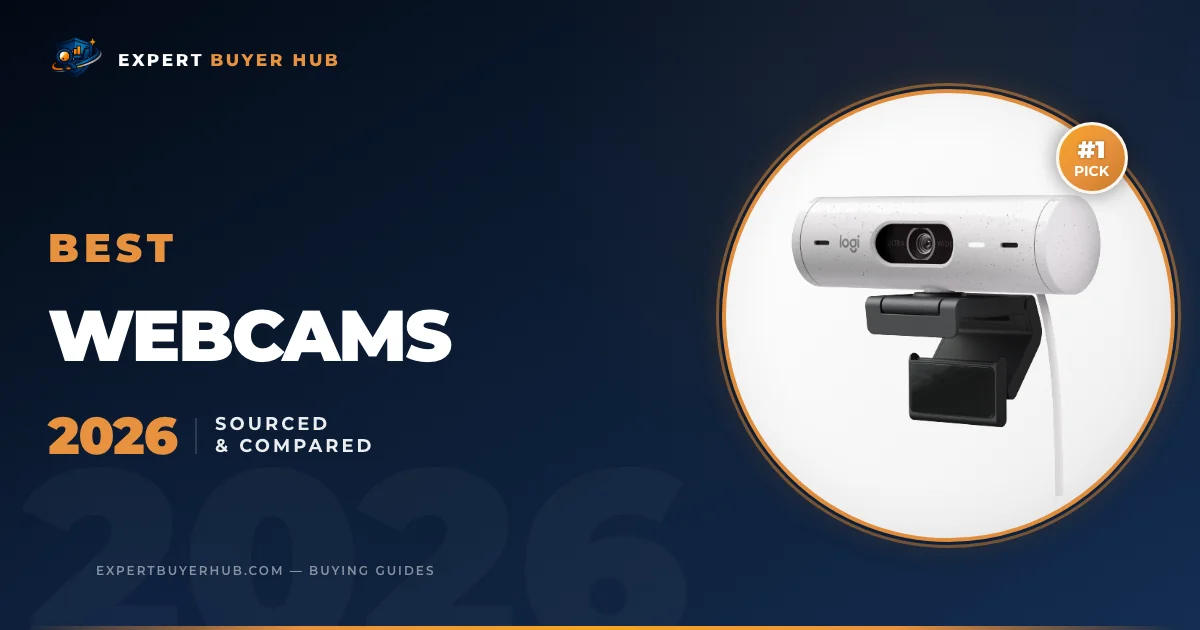
The Logitech Brio 500 is our first choice for everyday video meetings because it combines Full HD 1080p video, light correction, auto-framing, dual noise-reducing microphones, and a physical privacy shutter. It is not a 4K webcam. For 4K capture, the Razer Kiyo Pro Ultra is the specialist option in this group; for 1080p60 streaming with no built-in microphone, look at the Elgato Facecam MK.2.
We revised this guide from the manufacturers’ published specifications and support information. We compared maximum resolution and frame rate, focus, microphones, privacy controls, software requirements, connection type, and the setup each model is designed for. We did not use undocumented hands-on scores or laboratory measurements to rank these five webcams.
Our Top 3 Picks at a Glance
Quick Comparison — All 5 Finalists
| Webcam | Documented video | Best fit | Main trade-off |
|---|---|---|---|
| Logitech Brio 500 | Full HD 1080p | Everyday meetings | No 4K; auto-framing requires Logi Tune |
| Razer Kiyo Pro Ultra | Raw 4K30; up to uncompressed 4K24 or 1080p60 | Local recording and creator control | More camera than most calls require |
| Logitech C920x HD Pro | Full HD 1080p30 | Basic calls in a fixed setup | 30 fps ceiling |
| Elgato Facecam MK.2 | Full HD 1080p60 | Streaming with a separate microphone | No built-in microphone |
| Logitech Brio 101 | Full HD 1080p30 | Simple calls on a USB-A computer | Fixed focus and fewer controls |
Detailed Reviews
1. Logitech Brio 500 — Best Overall
Sale

Logitech Brio 500 Full HD Webcam with Auto Light Correction,Show Mode, Dual Noise Reduction Mics, Webcam Privacy Cover, Works with Microsoft Teams, Google Meet, Zoom, USB-C Cable – Off White Off-White Webcam
- Compatible with Nintendo Switch 2 Console
- Advanced Image Quality: Full HD 1080p webcam resolution provides outstanding image quality so everyone can see you clearly during meetings
- Auto Light Correction (RightLight 4): RightLight 4 video lighting technology automatically adjusts to the lighting in your environment, so you can be seen clearly even in low light
- Auto-Framing (RightSight): Auto-framing (1)(3) centers the video camera on you, allowing you to stand and move during meetings without leaving the frame
- Show Mode: Present your work or other objects on your desk with Show Mode, which lets you tilt the web camera up or down with one hand
−$30.00
$99.99

Best fit: Best Overall
Logitech specifies the Brio 500 as a Full HD 1080p webcam, not a 4K model. Its documented features include RightLight 4 light correction, RightSight 4 auto-framing, Show Mode, dual noise-reducing microphones, USB-C connectivity, and a physical privacy shutter.
It is the most balanced meeting-focused option in this five-model shortlist on paper. The important limitation is software: Logitech says RightSight auto-framing requires Logi Tune, and Logi Tune is not available for ChromeOS. Choose it for 1080p meetings and desk presentations; skip it if you need native 4K capture or cannot use the required software.
Pros
- RightLight 4 automatic light correction is included
- RightSight auto-framing is designed to keep the user centered
- USB-C connection; Logitech lists compatibility with Teams, Zoom, and Google Meet
- Two built-in microphones with noise reduction, according to Logitech
- Physical privacy shutter included
Cons
- Capped at 1080p — no 4K option at this price point
- Auto-framing can be distracting during presentations with multiple on-screen elements
2. Razer Kiyo Pro Ultra — Premium Pick

Razer Kiyo Pro Ultra 4K Webcam: Large Sensor – Auto Light Correction – Built-in Mic and Shutter – Pro Grade Content Creation, Streaming, Gaming, Video Calls – Works with OBS, Xsplit, PC, Zoom, Teams
- DSLR LIKE 4K QUALITY — Featuring a bigger sensor with a 2.9 μm pixel size, the Kiyo Pro Ultra with 1/1.2″ Sony STARVIS 2 Sensor captures more light and image data in every pixel, ensuring exceptional detail and color for pro-grade content creation and streaming
- CLARITY IN ANY LIGHT — To maximize the sensor’s full potential, the webcam is fitted with a custom F/1.7 Aperture Lens that can let in vast amounts of light, providing clear, crisp images even in low-light conditions
- AI POWERED VIDEO IMAGING — Always stay sharp and well-lit with a webcam that’s not only capable of tracking the face and holding a steady focus but automatically adjusts light levels to keep the face perfectly exposed
- PORTRAIT MODE-LIKE QUALITY — The lens can artfully blur the background while keeping clearly in focus without the need for software, adding a real sense of depth and dimension to every shot
- TRUE TO LIFE COLORS — HDR technology at 30 FPS can add more visual detail and texture by making colors pop, even for the darkest and lightest tones; automatically refine the webcam’s lighting and contrast while correcting over and underexposed areas
Best fit: Premium Pick
Razer documents a 1/1.2-inch Sony STARVIS 2 sensor, an f/1.7 lens, face-tracking autofocus, auto exposure, and raw 4K30 capture that can be output as uncompressed 4K24 or 1080p60. Those are manufacturer specifications, not measurements made by EBH.
Razer Synapse exposes zoom, pan, tilt, ISO, shutter speed, and other controls, while the camera has a built-in shutter. That makes the Kiyo Pro Ultra the most configurable 4K option here. Skip it for routine calls where 1080p, a smaller body, and simpler software are enough.
Pros
- 1/1.2-inch Sony STARVIS 2 sensor and f/1.7 aperture, per Razer’s specifications
- 4K 24fps and 1080p 60fps modes
- Face tracking and adaptive exposure are listed features
- Manual camera controls are available through Razer Synapse
- Adjustable 72–82° field of view with 4x digital zoom
Cons
- High price makes it overkill for casual video calls
- Razer Synapse software adds system overhead
- Bulkier form factor than most desktop webcams
3. Logitech C920x HD Pro — Best Value

Logitech C920x HD Pro PC Webcam, Full HD 1080p/30fps Video, Clear Audio, HD Light Correction, Works with Microsoft Teams, Google Meet, Zoom, Nintendo Switch 2’s new GameChat Mode, Mac/Tablet- Black 1 Pack C920X Webcam
- Compatible with Nintendo Switch 2’s new GameChat mode
- HD lighting adjustment and autofocus: The Logitech webcam automatically fine-tunes the lighting, producing bright, razor-sharp images even in low-light settings. This makes it a great webcam for streaming and an ideal web camera for laptop use
- Advanced capture software: Easily create and share video content with this Logitech camera that is suitable for use as a desktop computer camera or a monitor webcam
- Stereo audio with dual mics: Capture natural sound during calls and recorded videos with this 1080p webcam, great as a video conference camera or a computer webcam
- Full HD 1080p video calling and recording at 30 fps. You’ll make a strong impression with this PC webcam that features crisp, clearly detailed, and vibrantly colored video
$107.82
Best fit: Best Value
The C920x listing specifies Full HD 1080p at 30 fps, autofocus, light correction, and stereo microphones. Logitech’s current C920s product page documents the same core 1080p30 format for this C920 family, but bundle contents and the privacy-shutter arrangement can vary by exact SKU.
Its appeal is a familiar 1080p30 setup without creator-oriented controls. The 30 fps ceiling matters if you record fast motion or want 1080p60. Check the exact C920x bundle before buying rather than assuming accessories shown for a different C920 SKU are included.
Pros
- 1080p at 30fps, according to Logitech’s specifications
- Autofocus and two built-in microphones
- Adjustable mounting clip for monitors and laptop screens
- USB connection with Windows and macOS support listed by Logitech
- A long-running model family with broad software support
Cons
- Full HD capture is capped at 30fps
- No auto-framing feature
4. Elgato Facecam MK.2 — Best for Streaming
Sale

Elgato Facecam MK.2 – Premium Full HD 1080p Webcam for Streaming, Gaming, Video Calls, Recording, HDR Enabled, Sony Sensor, PTZ Control – Works with OBS, Zoom, Teams, and More, for PC/Mac
- Pro Image performance: Achieve lifelike visuals with smooth motion on camera, complemented by professional-grade image capture that enhances natural colors even in dimly lit settings.
- Set the shot: Features Camera Hub software, offering extensive customization options to enhance video quality, akin to those available with DSLR cameras.
- HDR-enabled: Seamlessly conquer high-contrast lighting challenges with stunning clarity in 1080p60 resolution.
- Built-in privacy: Enjoy peace of mind with the convenience of an easy-slide shutter for added security and control over your privacy.
- Uncompressed: Capture low-latency video with enhanced detail and fidelity, ensuring optimal quality for your footage. Supported resolutions (uncompressed*): 1080p60, 1080p30, 720p120, 720p60, 720p30, 540p120, 540p60, 540p30. Note: USB 2.0 compressed and USB 3.0 uncompressed.
−$10.00
$129.99
Best fit: Best for Streaming
Elgato specifies uncompressed 1080p60 over USB 3.0, a Sony STARVIS CMOS sensor, an 84-degree field of view, Camera Hub controls, and a physical shutter. The fixed-focus range is 30–120 cm (11.8–47.2 in).
This model makes the clearest sense for streamers who want 1080p60 and plan to tune the image in Camera Hub. It has no built-in microphone, and its fixed focus is less forgiving if you move outside the documented range. Skip it if you want a single USB device to handle both video and audio.
Pros
- Uncompressed 1080p 60fps output with a Sony STARVIS CMOS sensor
- Exposure, shutter speed, ISO, white balance, and framing controls in Camera Hub
- HDR mode is available at 1080p60
- Sliding privacy shutter included on the MK.2
- Elgato lists compatibility with OBS, Zoom, and Microsoft Teams
Cons
- No built-in microphone — requires a separate mic for audio
- Best value within the Elgato ecosystem; less compelling as a standalone purchase
5. Logitech Brio 101 — Budget Pick
Sale

Logitech Brio 101 Full HD 1080p Webcam for Meetings, Streaming, Desktop, Laptop, PC – Built-in Mic, Shutter, Works with Zoom, Microsoft Teams, Nintendo Switch 2’s new GameChat Mode, USB-A,-Black 1 Pack 1080p Black
- Compatible with Nintendo Switch 2’s new GameChat mode
- Auto-Light Balance: RightLight boosts brightness by up to 50%, reducing shadows so you look your best—compared to previous-generation Logitech webcams (1)
- Privacy with a Slide: The integrated webcam cover makes it easy to get total, reliable privacy when you’re not on a video call
- Built-In Mic: The built-in microphone lets others hear you clearly during video calls
- Easy Plug-And-Play: The Brio 101 works with most video calling platforms, including Microsoft Teams, Zoom and Google Meet—no hassle; it just works
−$15.00
$24.99
Best fit: Budget Pick
The Amazon listing identifies this SKU as Brio 101. Logitech’s current consumer page for the closely related Brio 100 documents Full HD 1080p30, auto-light balance, an integrated privacy shutter, one built-in microphone, fixed focus, and USB-A connectivity. Confirm the exact model name and included cable on the listing before ordering.
This is the basic option for a fixed desk and ordinary calls. It does not provide the Brio 500’s auto-framing or dual noise-reducing microphones. Skip it if you need autofocus, frequent reframing, or more control over the image.
Pros
- Full HD 1080p resolution in a simple USB-A design
- RightLight automatic light balance is included
- Physical privacy shutter included
- USB-A plug-and-play connection
Cons
- Fixed focus and fewer lighting controls than the higher-tier picks
- One built-in microphone rather than a stereo pair
- No auto-framing or advanced camera-control software
How to Choose a Webcam — Buyer’s Guide
Choose by the output your calls or recordings can use, then check focus behavior, microphone needs, software requirements, connection type, and privacy controls. A higher resolution does not fix poor lighting, weak audio, or a mount that does not suit your screen.
Source note: product specifications in this revision come from the linked Logitech, Razer, and Elgato product pages, checked September 11, 2026. The FTC page on app privacy is used only for privacy context; it is not a TechRadar resolution guide and does not verify any webcam’s performance.
Resolution and Frame Rate
For ordinary calls, 1080p30 is a practical baseline. The Elgato Facecam MK.2 adds documented 1080p60 capture, while the Razer Kiyo Pro Ultra adds 4K capture and more manual control. Whether either upgrade is useful depends on the resolution and frame rate accepted by your meeting, streaming, or recording workflow.
Lighting Performance
Sensor size, aperture, exposure processing, and the light in your room all affect the image. Razer publishes a 1/1.2-inch sensor and f/1.7 lens for the Kiyo Pro Ultra; Logitech documents RightLight correction for the Brio models; Elgato documents HDR modes for the Facecam MK.2. Treat those as design features, not a guarantee that one camera will look better in every room.
Microphone Quality
The Brio 500 has two noise-reducing microphones, the C920 family uses stereo microphones, and the Brio 100 family has one microphone. The Elgato Facecam MK.2 has no microphone. If voice quality matters, compare a short call recording from your own room or use a separate headset or microphone.
Platform and Software Compatibility
Compatibility varies by feature, not just by whether video appears. Logitech says Brio 500 auto-framing requires Logi Tune and that Logi Tune is unavailable on ChromeOS. Elgato lists Camera Hub for Windows and macOS. Razer’s advanced controls rely on Synapse. If you use a managed work computer, Chromebook, dock, or USB adapter, verify the software and port requirements before buying. Our wireless earbuds guide covers separate audio options.
Related desk setup resources
If you are upgrading a webcam, the surrounding desk setup can affect video quality and comfort too. Compare this guide with our monitor arm picks, ergonomic chair guide, standing desk recommendations, and portable charger roundup.
For neutral remote-work and privacy context, review the FTC guidance on app privacy and CISA account-security guidance.
Frequently Asked Questions
What is the best webcam for Zoom calls in 2026?
The Logitech Brio 500 is the most balanced meeting-focused option in this shortlist. It combines 1080p video, RightLight 4, dual noise-reducing microphones, and a privacy shutter. Auto-framing is not configuration-free: Logitech says it requires Logi Tune.
Do I need a 4K webcam for streaming?
Not necessarily. A 4K camera can help when you record locally and crop the frame, but the useful output still depends on your platform and computer. For 1080p60 streaming, the Elgato Facecam MK.2 is the simpler fit here; the Razer Kiyo Pro Ultra is for workflows that can use its 4K capture and manual controls.
What is the best budget webcam under $50?
The Logitech Brio 101 is the basic pick in this group. Its listing specifies 1080p video, light correction, a built-in microphone, and a privacy shutter. Check the current AAWP product card for price and availability rather than relying on a fixed price threshold.
Is the Logitech C920 still worth buying in 2026?
The C920x remains relevant if you want 1080p30, autofocus, and stereo microphones without creator-focused controls. The Brio 500 adds auto-framing and newer meeting features; the Facecam MK.2 adds 1080p60 but requires separate audio.
Can a webcam work without drivers on Mac and Windows?
Basic video may work through standard USB video support, but advanced features can require vendor software. Check the current operating-system, USB-port, and software requirements for the exact model. Brio 500 auto-framing, for example, requires Logi Tune.
If you are building a complete home office setup, compare our ergonomic chair guide. Our 1080p vs 4K webcam guide explains when extra capture resolution changes the result and when it does not.
How We Compared These Webcams
We checked the manufacturers’ published specifications for resolution, frame rate, focus, microphones, field of view, privacy hardware, connection type, and required software. We then matched those documented differences to common meeting and streaming setups. We have not published a controlled hands-on test log for these five models, so this revision does not claim measured differences in skin tone, autofocus speed, microphone clarity, or low-light performance. The FTC privacy guidance informs the privacy checklist only.
Final Verdict
Choose the Logitech Brio 500 for everyday 1080p meetings where auto-framing, dual microphones, and a privacy shutter matter. Choose the Razer Kiyo Pro Ultra only if your recording workflow can use 4K capture and detailed manual controls. The C920x is the straightforward 1080p30 option, the Elgato Facecam MK.2 is the 1080p60 streaming option with no microphone, and the Brio 101 covers basic fixed-desk calls. Use the live AAWP cards for current price and availability.
For the rest of the desk setup, compare our standing desk guide and confirm the dimensions and compatibility that matter for your workspace.
This guide was revised from current manufacturer documentation on September 11, 2026. See our evaluation policy for how EBH separates documented specifications from hands-on findings.
As an Amazon Associate, Expert Buyer Hub earns from qualifying purchases. This does not affect our recommendations or editorial integrity.
More in Technology


Expert Buyer Hub
Product Research & Comparisons
Our buying guides compare product specifications, manufacturer documentation, and other cited sources. They are research-based comparisons, not hands-on test reports unless an article explicitly documents its testing. Check each guide for its sources, selection criteria, and limitations.