
As an Amazon Associate, Expert Buyer Hub earns from qualifying purchases. This does not affect our recommendations or editorial integrity.
The best ergonomic office chair is the one you can adjust to your body and desk, not the one with the longest feature list. For this 2026 update, we compared four current chairs using model-specific manufacturer information, current product listings, adjustability, fit range, desk clearance, and the tradeoffs that matter after the first week. We did not physically test these chairs, so we removed the old hands-on claims, editorial scores, and fixed prices.
Our Verdict
The Newtral Magic H-GPRO is our best overall pick because its adjustable seat depth, backrest height, recline, headrest, and armrests give more people a realistic chance of finding a workable fit. The Hbada E3 Pro is the stronger choice for buyers who want a wider adjustment range and do not mind a more complicated chair. GABRYLLY is the simpler value option, while PatioMage suits shoppers who specifically want a footrest-style reclining chair and accept the extra bulk.
None of these chairs is a guaranteed solution for back or neck pain. OSHA recommends choosing a chair that fits the individual user, supports the lower back, allows the feet to rest on the floor or a footrest, and keeps armrests from forcing the shoulders upward. If possible, try a chair before the return window closes and adjust the rest of the workstation with it.
Our Top 3 Picks at a Glance
Quick Comparison — All 4 Finalists
| Chair | Best for | Key adjustment advantage | Main limitation |
|---|---|---|---|
| Newtral Magic H-GPRO | Best overall | Adjustable seat depth and backrest height | Laptop tray and footrest add bulk; exact marketplace bundle can vary |
| Hbada E3 Pro 2026 | Premium adjustability | Three-zone lumbar system, sliding seat, highly adjustable arms | Many moving parts and a larger footprint |
| GABRYLLY High Back | Simple value | Flip-up arms and straightforward tilt controls | Less fine adjustment than Newtral or Hbada |
| PatioMage High Back | Reclining with a footrest | Integrated footrest and broad backrest format | Bulkier design; listing details should be checked carefully |
How We Compared These Ergonomic Chairs
This is a sourced comparison, not a laboratory or hands-on test. We kept the four existing products and ASINs, then checked current model information against the criteria below. For Newtral and Hbada, we used the manufacturers’ current product pages. For GABRYLLY and PatioMage, the exact models are primarily documented through their current marketplace listings, so we avoided repeating uncertain measurements and warranty claims as fact.
- Fit and adjustability: seat height and depth, backrest position, lumbar placement, armrest range, and headrest usefulness.
- Workstation compatibility: whether the arms can clear a desk, whether the chair takes up extra space when reclining, and whether the seat is likely to suit different leg lengths.
- Support without medical promises: whether the design helps the user maintain a supported, neutral position. We did not treat manufacturer pain-relief language as clinical evidence.
- Complexity: more controls can improve fit, but they also take longer to understand and can be frustrating if the chair is shared.
- Honest limitations: each pick includes a clear reason to skip it.
Our general chair criteria follow OSHA’s computer-workstation guidance: an adjustable backrest with lumbar support, a seat that fits the user without pressing behind the knees, armrests that support relaxed shoulders without blocking the desk, stable casters, and feet supported by the floor or a footrest.
1. Newtral Magic H-GPRO — Best Overall
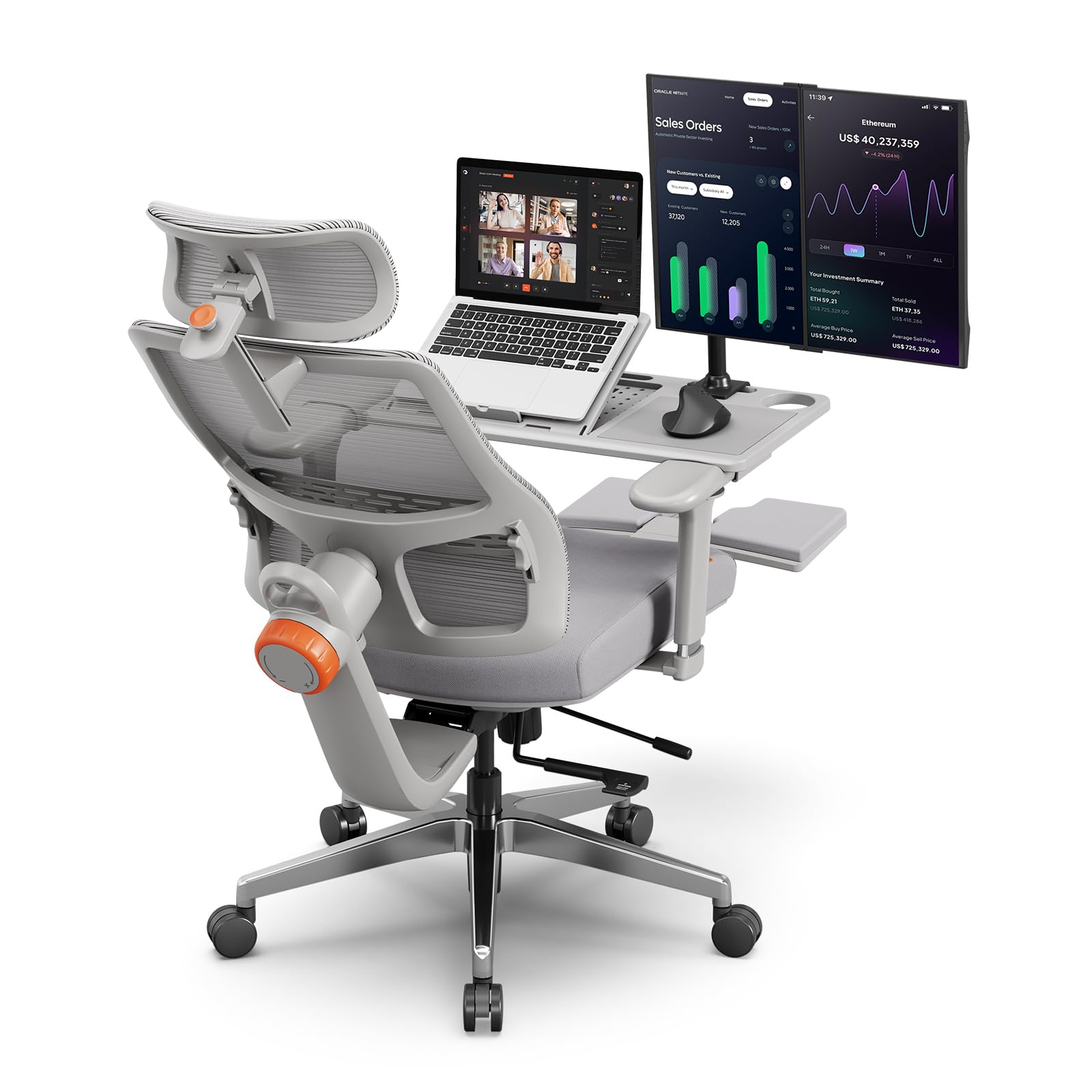
- 【Customized Laptop Table】The laptop table designed to match the chair can not only save space for working, reading, and playing games, but also relieve the pressure on your shoulders and waist. For some sedentary professionals, the multi-functional adjustment and footrest design allow you to sit all the time and enjoy time in the chair.
- 【Unique Adaptive Lumbar Support】The NEWTRAL Ergonomic Office Chair with Lumbar Support features a pioneering auto-tracking mechanism (the world's first). This innovative function automatically adjusts to the natural curve of your lower back, offering personalised support as you move. Whether working, gaming, or relaxing, it aligns with your spine, helping to relieve lower back pain.
- 【4D Armrest & Adaptive Headrest】Unlike other armrests that only offer vertical and horizontal adjustments, as well as a 15° rotation in 2D or 3D models, our selected 4D armrests can move sideways as well. Furthermore, The adaptive headrest automatically adjusts to fit your neck curve, providing perfect support.
- 【136° Recline Function and Footrest】The backrest of the NEWTRAL ergonomic office chair can tilt and lock between 96° and 136°. The knob at the base allows you to adjust the tension of the rocking feature. The built-in footrest extends up to 46 cm, making it suitable for users between 160 cm and 190 cm tall.
- 【Certified Durability & Aluminum Base】The KGS 4-level gas lift(Imported from Korea) has undergone over 100,000 lift and lower tests to ensure long-lasting safety and smooth operation. The robust aluminum base, tested by BIFMA, can withstand a static weight of up to 1236 kg. Recommended maximum weight: 350 lbs.
Newtral’s current Magic H-GPRO product page lists a 96° to 136° recline, adjustable seat depth, adjustable backrest height, a 5D headrest, 4D armrests, and a 300-pound stated capacity. That combination is more useful than a single headline feature because it lets the user change where the backrest, seat edge, arms, and head support meet the body.
The adaptive lumbar mechanism is the reason this chair stays at the top of the ranking. It is designed to maintain contact as the user changes posture. That may be preferable to a fixed pad for someone who alternates between upright work and a slight recline, but it is still a fit preference, not proof that the chair will relieve pain.
The exact Amazon bundle attached to this ASIN includes a laptop-table configuration in its title. That accessory can be useful for reading or short reclined sessions, but it should not replace a properly positioned desk, keyboard, and monitor. It also makes the chair more complex and may be unnecessary for buyers who stay upright most of the day.
Who It’s For
Choose the Newtral if you want several meaningful adjustments and are willing to spend time setting them up. Skip it if you want a simple chair with two or three controls, or if a laptop tray and footrest would crowd a small office.
Pros & Cons
- Seat-depth and backrest-height adjustments improve the odds of a good fit
- Adaptive lumbar design follows posture changes
- Wide recline range with headrest support
- Armrests adjust in several directions
- More complicated than a basic task chair
- Accessory bundle can be bulky
- Marketplace variant details should be checked before ordering
- No chair can guarantee relief from back or neck symptoms
2. Hbada E3 Pro 2026 — Premium Pick
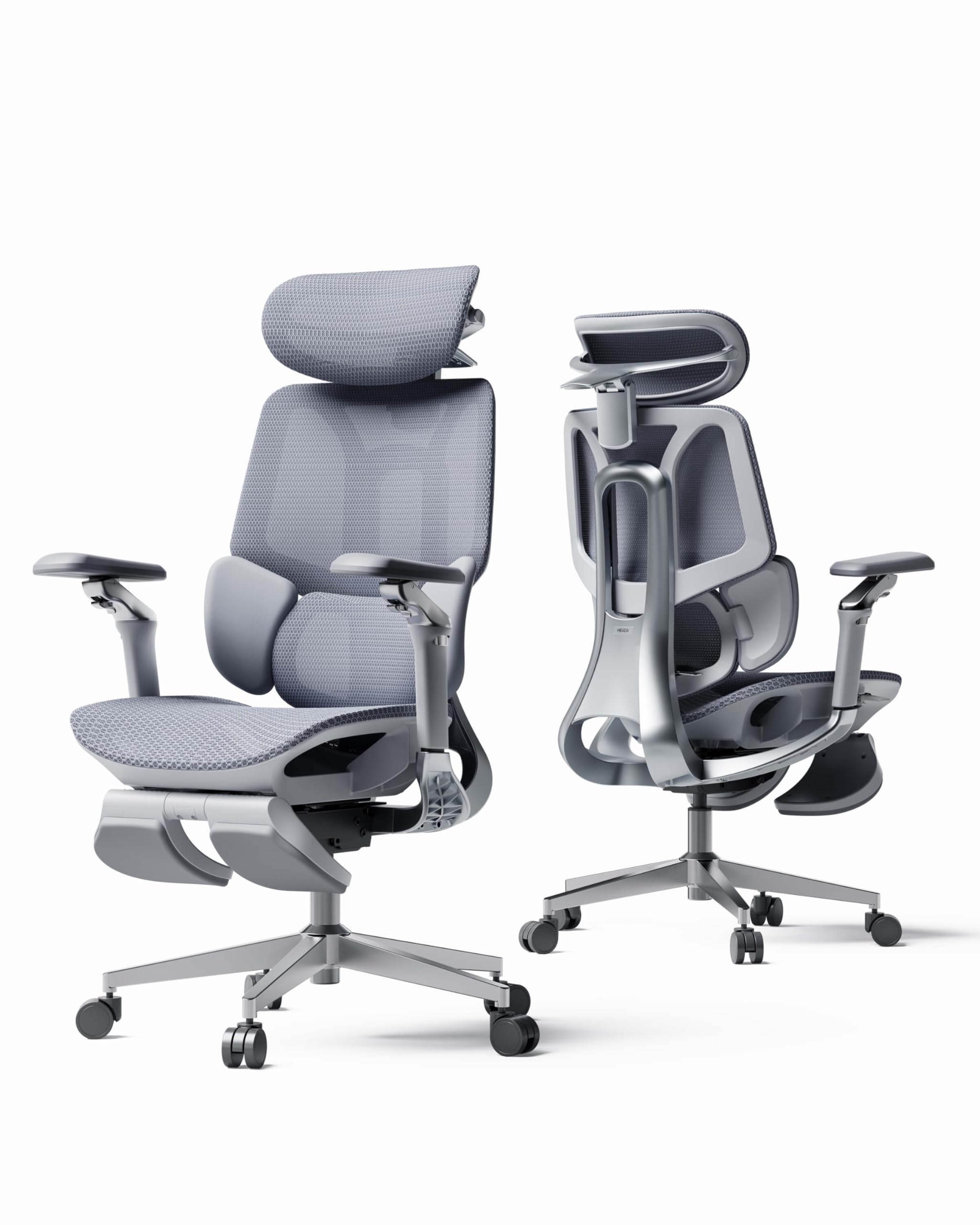
- DYNAMIC 3-ZONE LUMBAR SUPPORT: Adapts instantly to your posture using gravity—no electrical mechanisms needed. The lateral wings pivot (40°-80°) to wrap your back, while the 60mm vertical adjustment precisely targets the L1-L5 vertebrae, ensuring gapless support whether you are leaning forward or reclining
- UPGRADED 4D DUAL-AXIS HEADREST: Offers micrometer-level adjustment with 70mm depth, 40mm height, and 70° rotation. It provides zero-pressure neck support in any situation. The synchronized lifting system maintains perfect body alignment to effectively reduce shoulder tension and neck fatigue
- ADAPTIVE RECLINE UP TO 140°: Seamlessly transition between deep focus (105°), working (115°), relaxing (130°), and resting (140°). The next-generation gravity-sensing mechanism automatically adjusts tilt tension based on your body weight for smooth transitions and tailored comfort all day long
- NEW CLOUDMESH & 720° ARMRESTS: The latest technology high-elasticity mesh provides flexible support and optimal airflow. The 720° mechanical armrests (dual 360° rotation and 39° folding) guarantee zero-blind-spot floating support for your elbows, regardless of your arm position
- CUSTOM FIT & CERTIFIED SAFETY: Ideal for users from 5'1" to 6'5" (155-195cm) thanks to adjustable backrest (80mm), lumbar (60mm), and seat depth (50mm). The SGS-certified Class 4 gas cylinder and BIFMA compliance ensure absolute stability and heavy-duty durability with every use
Hbada publishes unusually detailed information for the current E3 Pro 2026 Edition. The company lists a three-zone lumbar system, a sliding seat, adjustable backrest height, a multi-axis headrest, highly adjustable armrests, and a 105° to 140° recline range. Its stated user range is 5’1″ to 6’5″, with a stated maximum load of 330 pounds.
This is the chair for buyers who treat fit as a calibration problem. The seat can move to change thigh support, the backrest can rise, and the lumbar area can be repositioned rather than left at one fixed height. Those controls can help a chair fit more body sizes, but the published range is not a promise that every person in that range will be comfortable.
The E3 Pro’s weakness is the same as its strength: complexity. A shared office may never use half of the controls, and the wide recline needs space behind the chair. The footrest version makes sense for readers who actually recline during breaks; upright typists can choose the simpler version and keep more room under the desk.
Who It’s For
Choose the Hbada if you want the broadest adjustment range in this group and will take the time to tune it. Skip it if you prefer simple controls, have very limited floor space, or rarely use a reclined position.
Pros & Cons
- Extensive seat, backrest, lumbar, armrest, and headrest adjustment
- Sliding seat helps accommodate different leg lengths
- Published fit and warranty information is more detailed than most marketplace listings
- Available with or without a footrest
- Large number of controls takes time to learn
- Recline requires more clearance behind the chair
- Premium positioning may not be worthwhile for occasional use
- Manufacturer comfort language is not medical evidence
3. GABRYLLY Ergonomic High Back — Best Value

- 【ERGONOMIC OFFICE CHAIR】- The ergonomic chair provides 4 supporting points(head/ back/ hips/ hands) and a proper lumbar support. Suitable for people of about 5'2" to 6'1"(Please refer to the height of the user). It's easy to adjust seat height, headrest, backrest and flip-up arms to meet different needs, good for sitting long hours.
- 【COMFORTABLE MESH SEAT】- The office chair is larger than other chairs, and it could accommodate different body build. The whole Chair Dimensions(including the arms): 24.5"W x 27.5"D x 46"-56.4"H, the Seat Dimensions: 20.5"W x 20"D x 18.9"-23.6"H. Loading Capacity: 300 lbs. The recline function makes you tilt the backrest back (90~120°) or sit straight freely.
- 【ADJUSTABLE FLIP-UP ARMREST】- Folding the armrests up 45°, you can push the executive office chairs directly under the desk to save valuable space. It's easy to raise or lower the folding armrest by pressing the black buttons on the armrest.
- 【BREATHABLE MESH CHAIR】- The mesh back and mesh seat keep air circulation for extra comfy. High quality mesh resists abrasion and transformation, it makes the high back computer desk chairs good for sitting for 4 ~ 8 hours, perfect for a long day sitting.
- 【3 YEARS WARRANTY & EASY INSTALLATION】- All ergonomic office chairs come with 3 years warranty, so please email us directly, we will offer you effective solutions ASAP. With clear instruction and tools, the office computer chair is easy to assemble (about 15~20 minutes). PU mute wheels roll smoothly, no harm on wooden floor; the sturdy five-pointed base and chair frame add durability and stylish appearances.

The GABRYLLY is the least complicated recommendation in the top three. Its current listing centers on a mesh high back, headrest, adjustable seat height, tilt, and flip-up arms. The flip-up arms are practical in a tight home office because they can move out of the way when the chair needs to slide under a desk.
Compared with Newtral and Hbada, the GABRYLLY offers fewer ways to fine-tune seat depth and lumbar position. That is not automatically a flaw. A chair with simpler controls can be a better buy when the basic dimensions suit the user. It becomes a poor choice when the fixed geometry does not match thigh length or lower-back position.
We kept this model as the value pick because it covers the main task-chair functions without making every component adjustable. Check the current listing’s dimensions against your body and desk before ordering, especially the seat depth, arm height, and recommended user range.
Who It’s For
Choose the GABRYLLY if you want a conventional mesh chair with flip-up arms and fewer controls to manage. Skip it if you need adjustable seat depth, precise lumbar-height control, or a chair tailored to an unusually short or tall frame.
Pros & Cons
- Flip-up arms help the chair fit under more desks
- Mesh back and headrest in a familiar task-chair layout
- Simpler setup than the two more adjustable picks
- Good fit for buyers who do not need a footrest
- Less control over seat depth and lumbar placement
- Fit depends heavily on the fixed seat and back dimensions
- Not the best option for buyers who want frequent reclined breaks
- Exact current variant details rely on the marketplace listing
4. PatioMage High Back — Best for a Footrest

- 【Ergonomic Design】PatioMage is committed to creating the most comfortable ergonomic mesh office chair. Our office chairs are perfectly designed according to the four curvatures of the human spine. With our ergonomic design based on human body curve and real needs from customers,it is easier to work in comfort by freely adjusting the headrest,lumbar support,armrest,seat depth & height,footrest as you need to truly make it perfect for a long office day at home!
- 【Adjustable Seat Depth】This office chair comes with seat depth adjust technology, an adjustable feature that can be adjusted 60mm to find the most suitable sitting position according to height and thigh length. It will effectively support the entire leg area and relieve leg pressure.
- 【Adjustable Lumbar Support】With split back design of lift & rotate lumbar support,your waist will be supported well.The lumbar support of this gaming chair provides a proper support by adaptive rotating 10 degrees for the natural curve of your waist.It can help to release your spinal pressure and really suitable for those who needs to sit for more than 10 hours daily.
- 【3D Adjustable Armrest】The arms of the branch ergonomic chair can be adjusted up and down,forward and backward, left and right to get the most comfortable sitting posture as you need.The armrests are designed with skin-friendly and PU soft materials to support your arms better.
- 【High-quality Materials】The desk chair is made of high-elastic special soft mesh.Highly breathable in mesh and highly durable in strength make the computer desk chair good for sitting for 10 hours or more.The footrest uses steel plate material to ensure the safety of the chairs and the comfort of the experience. With a maximum tilt of 135°, you can choose the right angle for your office hours or nap time.The base provide a strong bearing capacity max to 440lbs.
The PatioMage is the specialist pick in this list. Its current listing emphasizes a high back, adjustable lumbar area, headrest, reclining function, and integrated footrest. That package is aimed at buyers who shift between desk work and reclined breaks rather than people who want a compact task chair.
The footrest is useful only if the chair has enough room to recline and the desk setup still works when it is stowed. In a small room, the longer base and extra moving parts can become an annoyance. The product title and listing have also varied over time, so confirm the exact armrest style, dimensions, stated capacity, and included components on the current Amazon page.
We no longer label this chair as the cheapest option because live prices change and the old article’s fixed price claims were inconsistent. It remains fourth because its reclining format fills a clear use case, not because of a temporary discount.
Who It’s For
Choose the PatioMage if an integrated footrest is a real priority and you have enough space for it. Skip it if you need a compact chair, want precise seat-depth adjustment, or plan to keep the chair upright under a shallow desk.
Pros & Cons
- Integrated footrest supports a reclined-break use case
- High-back format with head support
- More relaxed seating style than a basic task chair
- Clear alternative for buyers who value recline over compactness
- Bulkier than the other chairs in this comparison
- Extra mechanisms add setup and maintenance points
- Current listing details should be checked before purchase
- Not ranked on a temporary price claim
How to Choose an Ergonomic Office Chair
Start with seat depth, not the headrest
A seat should support the thighs without pressing into the backs of the knees. If the seat is too deep, the user often slides forward and loses contact with the lumbar support. Adjustable seat depth is therefore one of the most useful features for households where more than one person uses the chair.
Check whether the lumbar support lands in the right place
A prominent lumbar pad is not helpful if it sits too high or too low. OSHA recommends a backrest that supports the lower back and can be adjusted for different seated postures. Height adjustment matters as much as how firm or dynamic the support feels.
Make sure the armrests work with the desk
Armrests should let the shoulders relax and keep the elbows near the body. They should not stop the chair from getting close to the keyboard. Flip-up arms are useful for desk clearance; multi-directional arms are better when the user switches between typing, a mouse, and a wider device setup.
Treat published fit ranges as a starting point
Two people of the same height can have different leg and torso proportions. Compare seat height, seat depth, arm spacing, and backrest range with a chair that already fits you. Keep the packaging until you know the chair works, and read the return policy before assembly.
Sources
- OSHA Computer Workstations: Chairs
- OSHA Computer Workstation Evaluation Checklist
- Newtral Magic H-GPRO product specifications
- Hbada E3 Pro 2026 product information
- Current model listings linked through the AAWP product cards above for GABRYLLY and PatioMage.
Frequently Asked Questions
What makes an office chair ergonomic?
An ergonomic chair can be adjusted so the user’s back is supported, feet rest on the floor or a footrest, thighs are supported without pressure behind the knees, and armrests do not force the shoulders upward. The right settings depend on the person and the desk.
Is dynamic lumbar support always better?
No. Dynamic support can maintain contact as the user changes posture, but some people prefer a simpler fixed support. Placement and fit matter more than the marketing label.
Should I choose mesh or a padded seat?
Mesh can improve airflow, while padding may feel more familiar. Neither material guarantees comfort. Seat shape, tension, width, depth, and the user’s weight distribution usually matter more than the material alone.
Can an ergonomic chair prevent back pain?
No chair can promise to prevent or treat back pain. A chair that fits well can support a more neutral posture and reduce awkward positions, but workstation setup, movement, breaks, and individual health conditions also matter. Persistent pain should be discussed with a qualified healthcare professional.
Do I need a footrest?
A footrest helps when the chair must be raised for the desk and the user’s feet no longer rest flat on the floor. An integrated reclining footrest serves a different purpose and usually takes more space.
About the Author
Expert Buyer Hub compares product specifications, current listings, manufacturer documentation, and practical ownership tradeoffs. We correct older guides when a claim cannot be supported and separate sourced comparisons from genuine hands-on testing.
Expert Buyer Hub is a participant in the Amazon Services LLC Associates Program. We may earn a commission from qualifying purchases made through links on this page, at no additional cost to you.
More in Office & Productivity



Expert Buyer Hub
Product Research & Comparisons
Our buying guides compare product specifications, manufacturer documentation, and other cited sources. They are research-based comparisons, not hands-on test reports unless an article explicitly documents its testing. Check each guide for its sources, selection criteria, and limitations.